About this app
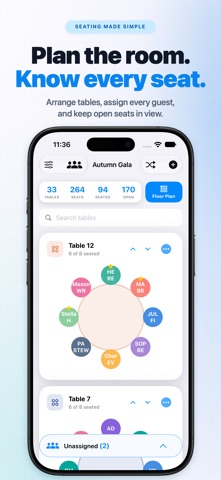
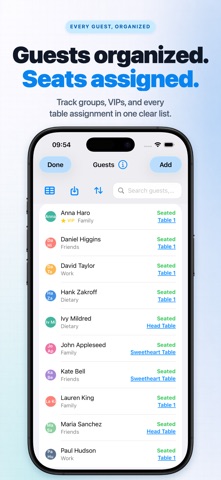
From intimate dinners to conferences with hundreds of guests, Seatsy combines detailed guest management with a precise visual floor planner. Import CSV, TSV, or XLSX guest lists, bulk-edit details in spreadsheet mode, search and sort guests, assign or swap seats by drag and drop, arrange tables on a flexible canvas, and export PNG layouts or CSV guest lists. No account is required. Work fully offline with automatic saving, or enable iCloud sync to keep events updated across iPhone, iPad, and Mac. FLOOR PLAN & TABLE LAYOUTS • Adjust the canvas width and length for larger venue layouts • Drag and drop tables with snap-to-grid precision and magnetic alignment guides • Zoom, rotate, and fine-tune table placement • Choose round, rectangular, rectangular-with-ends, or banquet tables • Add up to 10 matching tables in one step • Start with ready-made templates for common event tables SPREADSHEET MODE & IMPORT/EXPORT • Edit multiple guests at once in a spreadsheet-style grid • Import CSV/TSV/XLSX files with smart column mapping and saved preferences • Paste tab- or comma-separated data directly from the clipboard • Assign guests to tables during import or manually • Export the full guest list with table assignments as CSV SMART GUEST MANAGEMENT • Drag and drop guests onto seats; assign, unassign, lock, or reserve seats • Drag one seated guest onto another to swap their seats • Use 4-character initials on guest badges for easier identification • Add notes, VIP status, built-in tags, or custom tags • Search by name, note, or tag, and sort A–Z or Z–A, both in the guest list and when assigning a seat • Find a guest in the list by the table where they are seated • Access a detailed in-app help guide SMART SEATING ACTIONS • Auto-Fill Open Seats to place unassigned guests instantly • Shuffle movable guests while preserving locked seats • Distribute VIPs evenly across tables • Clear all seats at once, while locked seats stay in place MULTI-DEVICE & EVENT WORKFLOW • Create, duplicate, and rename event plans • Optionally sync events across iPhone, iPad, and Mac with iCloud • Work offline with automatic saving and sync when iCloud becomes available • See table, seat, seated, and unassigned guest counts at a glance GETTING STARTED Create an event, add tables or start from a template, import or enter guests, and assign them to seats. Open Floor Plan to arrange the tables and refine the final layout. Seatsy works for weddings, receptions, banquets, conferences, corporate dinners, galas, parties, classrooms, and other events that need organized seating. Seatsy includes a free starter plan. Upgrade in Settings to unlock the full planning workspace. Terms of Use: https://pipsapps.com/terms.html Privacy Policy: https://pipsapps.com/privacy.html
Latest release
What’s New
Bug Fixes & Performance Improvements
Audience growth
Ratings growth
Baseline captured. Growth appears after the crawler observes a changed rating count.
Momentum comes from crawler snapshots for the tracked storefront. “Viral growth signal” means unusually fast recent rating gains; it is an indicator, not download data.
Price tracking
Price intelligence
- First observed Oct 15, 2026 · 3:48 PM Free
Screenshots