About this app
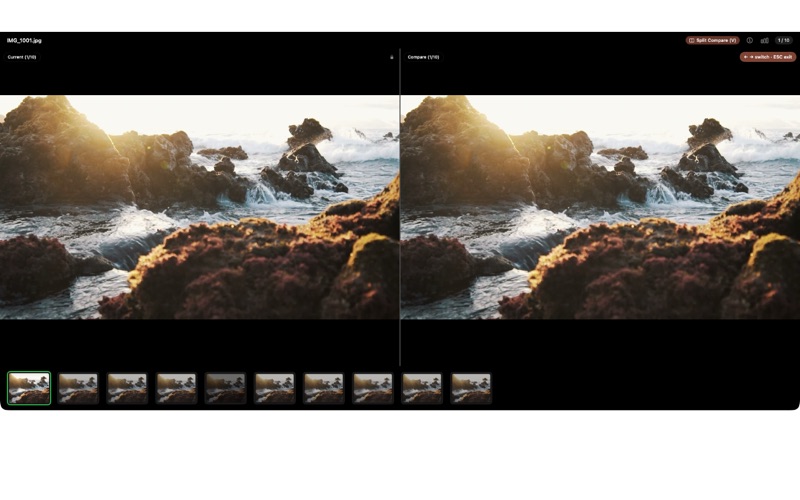
Your iPhone fired off 50 burst photos at the playground. Now they're sitting on your Mac, and you can't bring yourself to sort through them. ViewOne fixes that. Drop a folder in — ViewOne instantly detects every burst group. Compare side by side, pick your favorites with a tap, and send the rest to the Trash in one click. Can't decide? Let AI pick — it analyzes sharpness, exposure, composition, and expressions to find the keeper. — WHAT MAKES VIEWONE DIFFERENT — • AUTOMATIC BURST DETECTION Drop any folder. ViewOne groups burst sequences automatically — no manual tagging, no "sort by EXIF and squint at timestamps." Works on iPhone bursts, DSLR continuous shooting, screen-capture sequences. • SIDE-BY-SIDE COMPARE Review workbench shows the burst group inline. Press V for split-screen pixel-level compare. Press P to pick, X to reject. Keyboard-first by design — clear 200 photos in 15 minutes. • AI BEST PICK (Pro) AI analyzes sharpness, exposure, composition, and expressions across the burst and recommends the keeper. Faces open-eyed and smiling, no motion blur, best framing. You can always override. • EXIF PANEL Full EXIF for every photo — aperture, shutter, ISO, lens, GPS, camera body. Edit fields when you need to (corrected dates after a wrong-timezone shoot, for example). • ONE-CLICK CLEANUP Move rejects to Trash. Batch-export picks. The photos you keep stay; the duplicates you don't need stop eating your SSD. • LOCAL-FIRST Everything runs on your Mac. No upload, no cloud account, no AI server. Vision framework does the analysis locally. — WHO IS VIEWONE FOR? — • Parents whose camera roll is 70% burst-mode kid photos • Photographers reviewing continuous-shooting takes from a wedding or sports shoot • Anyone who has tried Gemini Photos and felt it auto-selects too aggressively, or PhotoSweeper and got lost in its settings panel • People with a Photos library at 200+ GB wondering where it all went • iPhone users who shoot Live Photos and want to keep one frame per moment — PRICING — Import, browse, compare, and clean up manually — no upgrade required. Pro unlocks AI Best Pick, batch automation, and advanced export. One-time lifetime purchase, no subscription. — FEEDBACK — Made by Peter Zhang. Every email at obeliskclubclub@gmail.com is read personally. Found a burst format we don't handle? Tell me. Learn more: obelisk.club/viewone-burst-photo-picker Privacy Policy: https://obelisk.club/viewone-burst-photo-picker/privacy Terms of Use (EULA): https://obelisk.club/viewone-burst-photo-picker/terms
Latest release
What’s New
Added • Drop a folder and ViewOne jumps straight into the picking view when it spots bursts. • AI Best Pick (Pro) — finds the sharpest shot with eyes open in each burst. Press ⌘B to keep it. • RAW + JPEG stay paired. Reject a JPEG and its RAW follows to Trash automatically. • Optional usage counter, fully on your Mac. Turn it off any time in Settings. Fixed • AI Best Pick now actually picks — the sparkle badge shows up, "Keep AI Only" works, and Batch Process keeps the right photo. • Deleting a JPG and HEIC that share one RAW no longer shows a false "partial delete" warning. • Fewer surprises when something else moves your files to Trash at the same time. Found a burst format we don't handle? obeliskclubclub@gmail.com
Audience growth
Ratings growth
Baseline captured. Growth appears after the crawler observes a changed rating count.
Momentum comes from crawler snapshots for the tracked storefront. “Viral growth signal” means unusually fast recent rating gains; it is an indicator, not download data.
Price tracking
Price intelligence
First snapshot captured. The trend line starts after the next crawler price observation.
- First observed Aug 15, 2026 · 1:53 PM Free
Screenshots