About this app
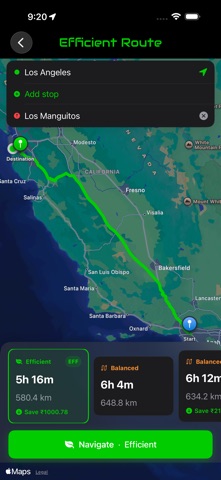
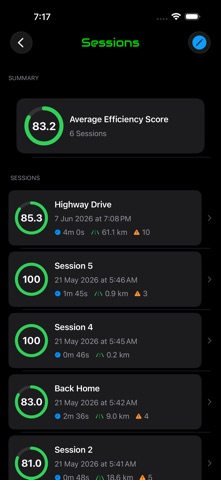
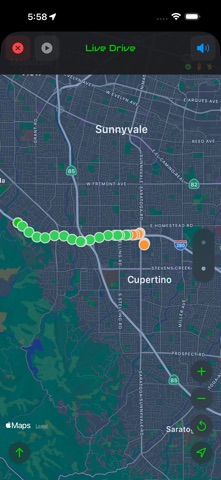
Efficiver — Efficient + Driver. Save. Drive. Live. Offline. Anytime. Anywhere. Real-time driving feedback that runs on your iPhone. No insurer dashboard. No ads. No advertising IDs. Just your drive, scored in real time, every trip. Efficiver is built for drivers who care about how they drive. The Efficiency Score updates live as you drive, blending speed, acceleration, idle time, gear use, route choice, and weather. Save a session and see exactly where the orange and red markers landed — and what to do next time. WHAT YOU GET Real-time Efficiency Score A single live score that reflects how efficient your driving is, second by second. Calibrated to your vehicle on first setup. AI-narrated insights, on-device (NEW in v1.5) Your Year in Driving and Your Patterns are written by Apple Intelligence, running entirely on your iPhone. Efficiver computes every number; the AI only puts them into words. Nothing leaves your device. Part of Efficiver Pro. Trends and patterns (NEW in v1.5) Your average efficiency at a glance, patterns that always have something to tell you, and an efficiency chart you can drag across to inspect any day. Apple Watch app Start and stop drives from your wrist, glance at your live score, distance and time mid-drive, and add the complication to your watch face. Smarter savings Wallet Watch prices your driving with a physics-based power model across your entire drive history. Every drive is priced under the fuel type you drove it with, so switching vehicles never rewrites your past savings. Live stats on your Lock Screen The Live Activity shows your score, distance and mistakes updating live through the drive — on the Lock Screen and Dynamic Island. CarPlay support Drive with your phone in your pocket. Tap Drive on your car's screen, see your live score and distance on the head unit, tap Stop to save. Voice prompts play through your car's audio. Interactive drive map Full-screen Apple Maps view that follows you as you drive, with markers showing exactly where each acceleration or braking event happened. Year Recap A shareable card with your year's driving stats — total kilometres, average efficiency, top drives, savings. Hands-free Siri voice control "Start drive in Efficiver" starts tracking in the background; "Stop drive in Efficiver" saves and speaks your score. Smart Detection (on-device ML) Efficiver learns your engine's signature with Apple's machine-learning frameworks — entirely on-device. No cloud calls. iCloud sync Sessions and your trained model sync across your devices via your own iCloud account. Join a fleet (invite only) Drives for an employer that runs Efficiver Fleet? Enter the invite code they give you. While you are on duty, those drives are shared with your fleet; off-duty drives stay on your phone. You choose when you are on duty, and you can leave the fleet at any time. ACCESSIBILITY Built accessibility-first: • Full VoiceOver support across every screen • Dynamic Type from default through AX5 • Reduce Motion, Reduce Transparency, Bold Text respected • Differentiate Without Color (every marker has a shape or text label) • Lifecycle announcements (Drive started, stopped, saved) PRIVACY Your drives are recorded and scored on your iPhone. GPS waypoints are stored locally, and on-device intelligence sends nothing off the device. iCloud sync uses your private iCloud database — no shared records, no advertising IDs, no data brokers. The one exception is fleets: if you join one with an invite code, drives you record while on duty are shared with that fleet so your employer can see them. You are told this before joining and must consent. Off-duty drives — and every drive if you never join a fleet — stay on your phone. REQUIREMENTS iPhone running iOS 26 or later. AI-narrated insights need an Apple Intelligence-capable device with the feature enabled. Apple Watch, CarPlay and iCloud optional. Save. Drive. Live. Offline. Anytime. Anywhere.
Latest release
What’s New
What's new in v1.5 AI-narrated insights, on your phone Your Year in Driving and Your Patterns are now written by Apple Intelligence, running entirely on your iPhone. Efficiver computes the numbers as always — the AI only puts them into words. Nothing leaves your device. Settings now has an Assistance screen showing whether on-device intelligence is active. Part of Efficiver Pro. A clearer Trends screen Trends opens with your average efficiency at a glance, and Your Patterns now always has something to tell you — it no longer waits on a forecast. The efficiency chart is easier to read and to explore: drag across it to inspect any day, and the page still scrolls normally. Refreshing keeps your chart on screen instead of blanking it. Auto-Start that tells you the truth Auto-Start can only detect drives in the background when Location is set to "Always". Efficiver now checks that properly and walks you to the setting when it's missing, instead of switching on a feature that couldn't actually run. Join a fleet, if your employer uses one Settings now has "Join a fleet" for drivers whose employer runs Efficiver Fleet — enter the invite code they give you. Only the drives you record while on duty are shared with your fleet; off-duty drives stay on your phone, and so does everything if you never join one. Easier to get around Cards on the Insights screen now say where they take you, and screen titles are more consistent throughout the app. Plus: smaller fixes across Trends and Settings. Thanks for driving with Efficiver.
Audience growth
Ratings growth
Baseline captured. Growth appears after the crawler observes a changed rating count.
Momentum comes from crawler snapshots for the tracked storefront. “Viral growth signal” means unusually fast recent rating gains; it is an indicator, not download data.
Price tracking
Price intelligence
First snapshot captured. The trend line starts after the next crawler price observation.
- First observed Aug 20, 2026 · 12:51 PM Free
Screenshots