About this app
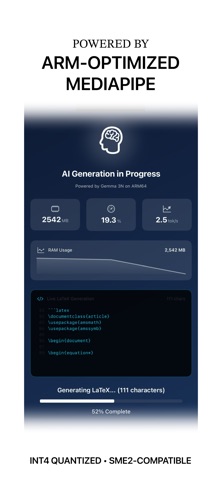
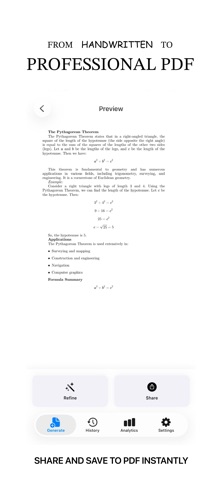
Transform handwritten math, lecture notes, and problem sets into beautiful, editable LaTeX and professional PDFs—entirely on your device. Img2LaTeX uses cutting-edge on-device AI to understand your mathematical documents and convert them to production-ready LaTeX code. No internet connection required. Your data never leaves your device. KEY FEATURES * 100% On-Device Processing Zero cloud dependencies. All AI inference runs locally using advanced vision models. Your privacy is guaranteed—no data ever leaves your iPhone. * Multimodal Vision AI Powered by advanced on-device vision models optimized for ARM processors. Process up to 5 images at once for multi-page documents. * Real-Time Streaming Watch LaTeX code generate token-by-token in real-time. Edit and refine as you go. * Professional PDF Output Client-side LaTeX rendering produces publication-ready PDFs. Perfect for homework, research papers, and lecture notes. * Performance Monitoring Live metrics show memory usage, battery impact, and thermal state during AI inference. Transparency you won't find elsewhere. * Model Selection Choose between 2B and 4B parameter models. Balance speed vs. accuracy for your use case. * Smart History All generations saved locally with search, favorites, and refinement tracking. Never lose your work. * LaTeX Refinement Iteratively improve conversions with user feedback. Each refinement learns from the previous attempt. TECHNICAL HIGHLIGHTS * ARM64 Optimized: Leverages Apple Silicon's matrix acceleration capabilities * INT4 Quantization: Efficient 4-bit models (~500MB for 2B, ~900MB for 4B) * SME2 Compatible: Automatic use of latest ARM extensions on iPhone 16 and M4 devices * SIMD Acceleration: Accelerate framework for parallel image preprocessing * Thermal Management: Adaptive performance tuning based on device temperature PERFECT FOR * Students converting homework to LaTeX * Researchers digitizing handwritten notes * Educators preparing problem sets * Anyone who needs fast, private math-to-PDF conversion PRIVACY FIRST Unlike cloud-based OCR services, Img2LaTeX processes everything locally. No server uploads, no data collection, no privacy concerns. Your intellectual property stays yours. HOW IT WORKS 1. Capture photos of your handwritten or typed math 2. Watch AI generate LaTeX code in real-time 3. Review and refine the output 4. Export as PDF or copy LaTeX code BUILT FOR THE ARM AI DEVELOPER CHALLENGE 2025 Img2LaTeX showcases production-grade on-device AI on iOS. Developed as part of Arm's AI Developer Challenge, this app demonstrates what's possible when you combine advanced multimodal models with ARM-optimized inference. OPEN SOURCE Img2LaTeX is fully open-source (MIT License). Explore the code, contribute improvements, or learn how to build your own on-device AI apps. GitHub: github.com/youneslaaroussi/Pic2PDF REQUIREMENTS: * iOS 17.0 or later * ~1GB free storage for AI models (downloaded on first launch) * No internet connection required after model download * Works on all ARM-based iOS devices (iPhone, iPad) Get started with on-device AI today. Convert math to PDF in seconds—privately and efficiently.
Audience growth
Ratings growth
Baseline captured. Growth appears after the crawler observes a changed rating count.
Momentum comes from crawler snapshots for the tracked storefront. “Viral growth signal” means unusually fast recent rating gains; it is an indicator, not download data.
Price tracking
Price intelligence
First snapshot captured. The trend line starts after the next crawler price observation.
- First observed Sep 8, 2026 · 3:12 AM Free
Screenshots