About this app
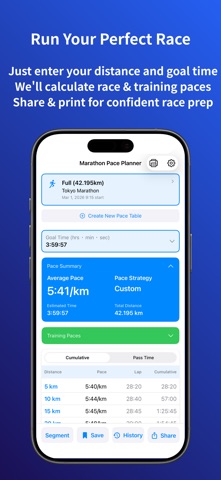
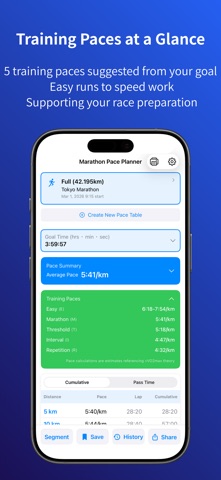
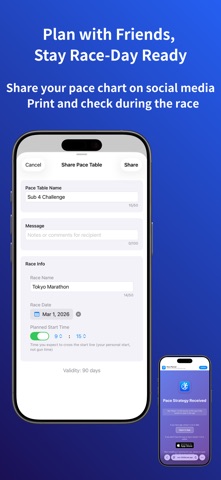
Marathon Pace Planner is a pace planning app designed for marathon runners. It helps you easily calculate and visualize split-by-split pacing to reach your target finish time, supporting you in building a smart race plan from preparation to race day. Key Features * Flexible Distance Settings - Marathon (42.195 km), Half Marathon (21.0975 km) - 30 km, 20 km, 10 km - Custom distance (1.0–200.0 km) * Strategic Pace Planning - Even Pace: Maintain a consistent pace throughout the race - Negative Split: Speed up in the second half (adjustable) - Positive Split: Start faster and slow down later (adjustable) - Custom Pace: Set your pace freely for each segment * Segment Elevation & Notes - Simple Mode: Select from 8 slope categories for auto-adjustment - Detailed Mode: Input precise elevation gain/loss per segment - GPX Import: Auto-import elevation data from GPX files (NEW) - Add notes to each segment; included in print and share output * Save & Manage Your Pace Charts - Save created pace charts with custom names - Load saved pace charts to edit and save as new versions * Race Info Management - Save race name, date, and start time with your pace chart - Share and print race info along with your pace chart * Passing Time Display - Set start time to see estimated passing times at each checkpoint - Perfect for race day time management * Race Reminder Notifications - Get reminders at 7 key times before your race by saving a race date - Customize notification timing in settings * Training Pace (NEW) - 5 training intensities (E/M/T/I/R) inspired by vVO2max theory - Tap the green card to view; auto-updates with your settings * Pace Chart Sharing - Share your pace chart with friends via social media or email - Open shared links directly in the app to view the pace chart * Print Your Pace Chart - Print your pace chart and carry it on race day - Check your pace anytime during the race with confidence * Custom Settings - Default values for custom distance, negative and positive split pace gap - Customize pace table column display order Recommended For - First-time marathon or half-marathon runners - Runners aiming for a new personal best - Anyone planning strategic pace strategies - Ultra-distance athletes Features - Simple: Set your target time; the app calculates automatically - Pace range: 2:00/km to 60:00/km, up to 48-hour plans - Accessibility: VoiceOver, Dynamic Type, Dark Mode - English and Japanese About Subscription This app is free to download and use. Subscribe to a paid plan to unlock more features. * Free Plan - Save up to 3 plans, share links valid for 3 days, print once daily * Basic Plan (monthly/yearly) - Ad-free experience - Print feature - Save up to 10 plans - Share links valid for 7 days * Pro Plan (monthly/yearly) - Ad-free experience - Print feature - Save up to 100 plans - Share links valid for 90 days - Payment will be charged to your Apple ID account - Subscription automatically renews unless canceled - You can manage and cancel your subscription in your Apple ID settings after purchase - Free trial will automatically renew to a paid subscription unless canceled before the trial ends Supported Environment - iOS 17.6 or later - Compatible with iPhone and iPad * Terms of Use (EULA) https://www.apple.com/legal/internet-services/itunes/dev/stdeula/ * Privacy Policy https://apps.obaonline.net/en/privacy/ Marathon Pace Planner focuses on pace calculation from preparation to race day.
Latest release
What’s New
You can now import elevation data from GPX files. ■ GPX Import Feature Import elevation data from GPX files in Custom Pace "Detailed Mode": • Select a GPX file to automatically set elevation for each segment • Auto-adjusts when GPX distance differs from pace chart distance Use GPX files from route planners like Strava to achieve more accurate elevation-based pace adjustments.
Audience growth
Ratings growth
Baseline captured. Growth appears after the crawler observes a changed rating count.
Momentum comes from crawler snapshots for the tracked storefront. “Viral growth signal” means unusually fast recent rating gains; it is an indicator, not download data.
Price tracking
Price intelligence
First snapshot captured. The trend line starts after the next crawler price observation.
- First observed Aug 26, 2026 · 11:11 PM Free
Screenshots