About this app
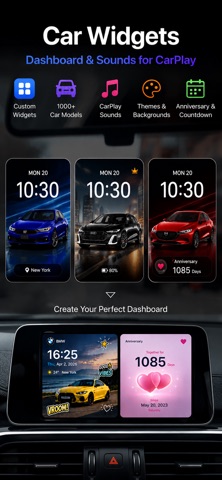
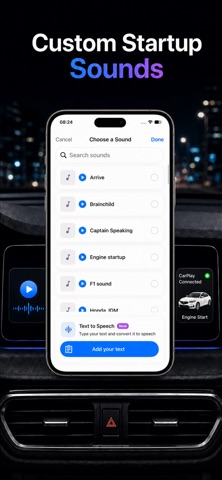
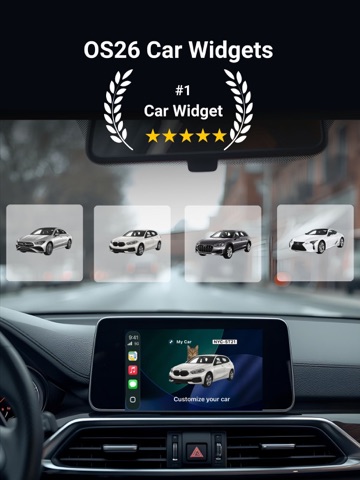
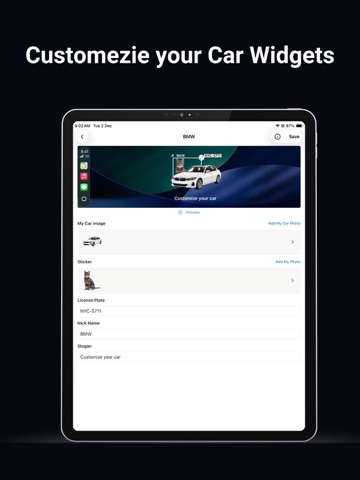
Create CarPlay Widgets Your Way Your car screen does not have to look the same every day. With CarWidgetGo, you can create personalized CarPlay widgets using ready-made templates or your own custom designs. Start with a stylish widget template, add your own vehicle photo, customize backgrounds, stickers, layouts, and startup-style sounds, then create a dashboard look that matches your car, mood, and driving style. Start With Ready-Made Templates CarWidgetGo includes a growing collection of themed widget templates, making it easy to create a beautiful car screen in seconds. Choose from a wide range of widget styles, including sporty, minimal, premium, photo, clock, anniversary, countdown, dashboard-style, and more. Pick a template, customize the details, and make it yours. Create Your Own Custom Widget Want more control? Use the custom builder to design your own CarPlay widget from scratch. Add photos, stickers, icons, text, backgrounds, and layout elements to create a widget that feels personal. Whether you want a clean dashboard look, a fun photo widget, a romantic anniversary widget, or a practical countdown widget, CarWidgetGo gives you the tools to build it. Make Your Car the Center Upload a photo of your own vehicle and turn it into the main visual of your widget. CarWidgetGo helps you create a dashboard style that feels connected to your real car. Clean Cutouts in One Tap Use automatic background removal to create cleaner car photos and better-looking widget designs without complicated editing. Explore More Widget Themes Discover a large collection of car-inspired and lifestyle-themed widgets, including: Car-themed widgets Clock widgets Photo widgets Anniversary widgets Countdown widgets Minimal widgets Premium-style dashboard widgets Add Stickers & Decorations Make your widgets more expressive with stickers, icons, labels, and decorative elements. Create a look that fits your personality, vehicle, memories, or favorite driving mood. Start With a Sound You Love Personalize your driving experience with startup-style sounds. Choose a sound that matches your style, from clean tones to powerful engine-inspired sounds. Quick, Simple, Personal Start fast with a template or build your own widget from scratch. CarWidgetGo makes it easy to create CarPlay widgets that look stylish, personal, and fun. Why You’ll Love CarWidgetGo Create custom CarPlay widgets Start with ready-made widget templates Explore a large collection of themed widget styles Design your own custom widget Add your own car photo Remove photo backgrounds in one tap Customize backgrounds, stickers, icons, and layouts Create anniversary and countdown widgets Add startup-style sounds Create a dashboard look that matches your car and style Perfect For Car owners who want a more personal car screen. Drivers who enjoy custom dashboard styles. Users who want anniversary, countdown, clock, or photo widgets in their car. Anyone who wants stylish CarPlay widgets without complicated editing. Make your car screen yours. Download CarWidgetGo and create personalized CarPlay widgets with templates, custom designs, car photos, anniversary themes, countdown widgets, stickers, backgrounds, and startup-style sounds. Upgrade to CarWidgetGo Premium to unlock all features. One-time purchase – CarWidgetGo Lifetime Premium Premium Yearly Pass – Annual Subscription Payment will be charged to your Apple ID account after confirmation of purchase. Subscriptions automatically renew unless canceled at least 24 hours before the end of the current period. You can manage or cancel subscriptions in your Apple ID account settings. Before using CarWidgetGo, please read our Terms of Service and Privacy Policy: https://www.4digsoft.com/terms-and-conditions.html https://www.4digsoft.com/privacy-policy.html Need help? Contact us: support@4digsoft.com
Latest release
What’s New
CarWidgetGo 2.0.0 is here! • Added ready-made widget templates • Added a large collection of themed widget styles • Create widgets faster with template-based editing • Improved custom widget creation experience • Added more backgrounds, stickers, and dashboard-style designs • Optimized the overall widget editing flow
Audience growth
Ratings growth
Baseline captured. Growth appears after the crawler observes a changed rating count.
Momentum comes from crawler snapshots for the tracked storefront. “Viral growth signal” means unusually fast recent rating gains; it is an indicator, not download data.
Price tracking
Price intelligence
First snapshot captured. The trend line starts after the next crawler price observation.
- First observed Aug 13, 2026 · 8:59 AM Free
Screenshots