About this app
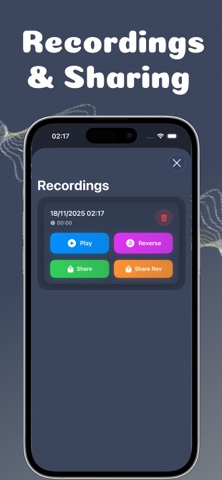
Reverse Audio is a feature-rich voice recorder and editor designed to let users capture, manipulate, and share audio recordings with fun playback controls and creative voice effects. Key Features: Main Recording Interface: The core screen features a prominent microphone button for quick recording, alongside easily accessible controls for playing back and reversing audio clips. Precision Speed Control: Users can finely tune the listening experience for both Normal and Reverse playback. Speeds range from 0.5x (half speed) up to 2x (double speed), with standard options like 1x, 0.7x, 1.2x, and 1.5x also available. Recordings Management: The Recordings section provides an organized list of saved audio clips, complete with the creation date and time Instant Playback and Sharing: From the Recordings screen, AudioFlip offers one-tap options to: Play the original recording. Reverse the recording. Share the normal version of the audio. Share Rev (Share Reverse) the reversed version for a unique way to share content. Delete unwanted clips. Creative Voice Effects : A wide selection of engaging voice-altering effects is available under the Effects tab, many of which appear to be premium features (indicated by the lock icon). Effects include: Helium Boost: High pitched & squeaky Shadow Growl: Dark & menacing voice Cave Echo: Cave-like echo effect Bear Bass: Deep & mysterious voice Space Modulator: Alien-like voice Metal Synth: Metallic & robotic voice Ghost: Ethereal-Whisper Seamless Navigation: Quick access tabs at the bottom allow users to easily switch between Recordings, Effects, and Settings. 3. Contact & Support Need help or have a suggestion? Contact us : https://upbeat-animantarx-f5b.notion.site/SUPPORT-2a9ee4e7706780e385a1eaa45243efc4?source=copy_link Terms of Use : https://upbeat-animantarx-f5b.notion.site/Reverse-Audio-2a4ee4e7706780e094ffd96b5d6b984c?source=copy_link Privacy Policy : https://upbeat-animantarx-f5b.notion.site/Reverse-Audio-Privacy-Policy-2a4ee4e7706780fb939bd2bf1cccb45e?source=copy_link
Latest release
What’s New
• Brand new user interface • Improved recording and playback experience • Faster performance and smoother animations • Minor bug fixes and stability improvements
Audience growth
Ratings growth
Baseline captured. Growth appears after the crawler observes a changed rating count.
Momentum comes from crawler snapshots for the tracked storefront. “Viral growth signal” means unusually fast recent rating gains; it is an indicator, not download data.
Price tracking
Price intelligence
First snapshot captured. The trend line starts after the next crawler price observation.
- First observed Aug 16, 2026 · 10:05 PM Free
Screenshots