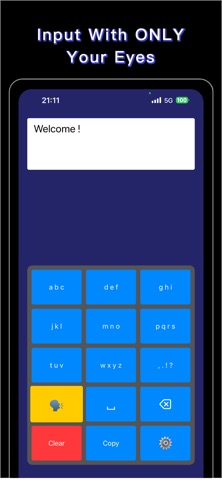
About this app
Eye Keyboard is an innovative assistive technology app that enables text input through eye movements alone. Designed with accessibility at its core, this app empowers individuals with limited mobility to communicate, type, and interact with their devices using only their eyes. **Who Can Benefit** Eye Keyboard is particularly helpful for individuals with conditions that limit physical movement but retain eye mobility, including: - ALS (Amyotrophic Lateral Sclerosis) - Locked-in Syndrome - Cerebral Palsy (CP) - Spinal Cord Injury (SCI) - Stroke survivors with severe motor impairment - Muscular Dystrophy - Multiple Sclerosis (MS) - Other conditions affecting motor control **Key Features** FREE: - Basic Eye-Tracking Technology: Try the core eye-tracking functionality - Grid-Based Keyboard: Test the interface with limited usage PREMIUM (In-App Purchase Required): - Advanced Eye-Tracking Technology: Full access to precise text input using your device's TrueDepth camera - Unlimited Usage: No restrictions on typing sessions - Smart Word Suggestions: Intelligent predictive text to speed up typing - Customizable Settings: Adjust sensitivity, dwell time, and other parameters to match your needs - Voice Output: Text-to-speech functionality to help you communicate - Email Integration: Send emails directly from the app ALL VERSIONS: - Hands-Free Operation: Complete text input without touching the screen - Privacy-Focused: All processing happens on your device - no data leaves your phone **How It Works** 1. Position your device at a comfortable viewing distance 2. Look at the keyboard grid displayed on screen 3. Focus your gaze on the desired letter or function 4. The app detects your eye position and makes selections based on dwell time 5. Build words and sentences naturally through eye movements **Important Medical Disclaimer** Eye Keyboard is designed as a communication and accessibility aid. This app is NOT a medical device and is not intended to diagnose, treat, cure, or prevent any disease or medical condition. It should not be used as a substitute for professional medical equipment, medical advice, diagnosis, or treatment. Always consult with qualified healthcare professionals regarding your medical needs. **Privacy and Security** Your privacy is our priority. Eye Keyboard processes all eye-tracking data locally on your device. We do not collect, store, or transmit your eye-tracking information or typed content to any external servers. For more information: - Privacy Policy: https://lago.chat/eye/privacy-policy.html - Terms of Use: https://lago.chat/eye/terms-of-use.html **Requirements** - Device with TrueDepth camera (iPhone X or later, iPad Pro 11-inch or later, iPad Pro 12.9-inch 3rd generation or later) - iOS 13.0 or later - ARKit support **Support** We are committed to making Eye Keyboard the best assistive technology tool possible. If you have questions, feedback, or need assistance, please reach out to our support team through the app's contact feature. Eye Keyboard - Empowering communication through eye-tracking technology.
Latest release
What’s New
Minor bug fixes
Audience growth
Ratings growth
Baseline captured. Growth appears after the crawler observes a changed rating count.
Momentum comes from crawler snapshots for the tracked storefront. “Viral growth signal” means unusually fast recent rating gains; it is an indicator, not download data.
Price tracking
Price intelligence
First snapshot captured. The trend line starts after the next crawler price observation.
- First observed Aug 8, 2026 · 2:42 PM Free
Screenshots