About this app
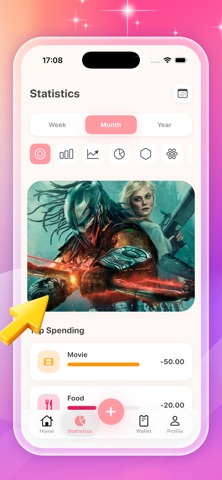
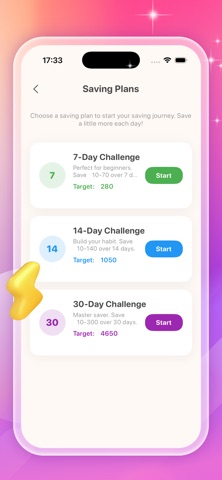
Hanbady: Your all-in-one financial assistant, helping you manage your money smarter. Hanbady is an intuitive budgeting, expense tracking, and savings app designed to simplify your financial life and give you easy control over your finances. Whether you're tracking your daily coffee expenses, creating a monthly budget, or saving for a big goal (like buying a new iPhone!), Hanbady transforms complex financial tasks into quick and easy operations. Instant Income and Expense Tracking Record transactions with just three taps: categorize (dining, entertainment, paycheck, etc.), add notes (e.g., "I want a burger"), and even add photos (e.g., receipts or photos of meals) for easy viewing. Hanbady automatically syncs your data, allowing you to see where your money is in real time. Visualize your finances with insights Gain a clear understanding of your spending habits through interactive charts and statistics: Break down by month/week/year (e.g., "71% of your spending goes to movies, 28% to food") Calendar view to track your daily totals (spending + income) Key spending categories to help you discover money-saving opportunities Save more wisely with challenges and goals Develop healthy saving habits with guided challenges: 7-Day Challenge (Save 10-70 yen; Goal: 280 yen) 14-Day Challenge (Save 10-140 yen; Goal: 1050 yen) 30-Day Challenge (Save 10-300 yen; Goal: 4650 yen) Set custom savings goals (e.g., "Buy a new iPhone") and track your progress daily—Hanbady keeps you motivated to achieve your goals. Secure and Privacy Protect your financial data with a password-protected private space—your information is safe, giving you peace of mind when managing your finances. Why Choose Hanbady? No complicated spreadsheets needed—a clean and easy-to-use interface Real-time updates for a clear overview of your finances Flexible budgeting, tracking, and savings tools Help you make smarter financial decisions
Latest release
What’s New
Fixed a bug related to ad display.
Audience growth
Ratings growth
Baseline captured. Growth appears after the crawler observes a changed rating count.
Momentum comes from crawler snapshots for the tracked storefront. “Viral growth signal” means unusually fast recent rating gains; it is an indicator, not download data.
Price tracking
Price intelligence
First snapshot captured. The trend line starts after the next crawler price observation.
- First observed Aug 23, 2026 · 6:09 AM Free
Screenshots