About this app
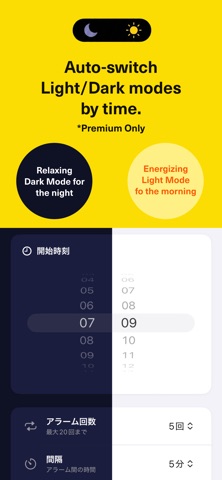
No More Oversleeping—Wake Up with Relarm. 6:00, 6:05, 6:10, 6:15... Sound familiar? Setting alarms every 5 minutes? If you're not a morning person and keep hitting snooze or sleeping through alarms, you've probably set multiple alarms—only to dismiss them one by one when you finally wake up. With Relarm, set multiple alarms automatically with just one tap. Plus, it's packed with features designed to help you actually wake up. Customize interval and count: From intense 1-minute intervals to gentle 10-minute gaps, 2-3 times. Puzzle unlock required: A simple puzzle prevents you from dismissing alarms while half-asleep. Persistent alarm sounds: Hard-to-ignore alerts that keep ringing. Random sound playback: Different sounds for each alarm so you don't get used to them. Test playback: Preview volume to avoid setup mistakes. ▼ Perfect For You If... Mornings are your nemesis One alarm is never enough You set alarms every 5 or 10 minutes You desperately want to stop oversleeping ▼ Key Features 【Easy Batch Setup】 Just choose start time, number of alarms (up to 20), and interval. No more adding alarms one by one. Your last settings for count, interval, and sound are automatically saved. 【Puzzle Unlock to Prevent Oversleeping】 You need to solve a puzzle to dismiss the alarm. No more accidentally turning off alarms while still half-asleep. 【Multiple Sounds】 Choose from a variety of alarm sounds. Random playback mode helps prevent sound fatigue. 【Dark / Light Mode】 Switch between a sleep-friendly dark theme and a bright, energizing light theme. Premium members can set automatic theme switching based on time of day. ▼ Pricing Basic features are free. Upgrade to Premium ($1.99/month or $19.99/year) to unlock: Unlimited alarm settings Ad-free experience Automatic theme switching by time of day No More Oversleeping—Wake Up with Relarm. Terms of Use: https://u-i-apps.com/relarm/terms.html
Latest release
What’s New
Our pricing has changed to a one-time payment system. With a single purchase, you will get lifetime access to unlimited alarms and a completely ad-free experience.
Audience growth
Ratings growth
Baseline captured. Growth appears after the crawler observes a changed rating count.
Momentum comes from crawler snapshots for the tracked storefront. “Viral growth signal” means unusually fast recent rating gains; it is an indicator, not download data.
Price tracking
Price intelligence
First snapshot captured. The trend line starts after the next crawler price observation.
- First observed Aug 8, 2026 · 5:28 PM Free
Screenshots