About this app
Gymnastics Meet Expenses is the ultimate expense tracking solution designed specifically for gymnastics meet managers, judges, and event coordinators. COMPREHENSIVE EXPENSE TRACKING • Track all meet-related expenses with detailed categorization • Record mileage, per diem, hotel, and miscellaneous costs • Attach receipts and notes to individual expenses • Monitor spending across multiple events and associations PROFESSIONAL INVOICING • Generate detailed PDF invoices with itemized expenses • Include session details, dates, times, and floor assignments • Automatic calculations with subtotals and grand totals • Share invoices via email or save to Files MULTI-EVENT MANAGEMENT • Organize expenses by event, association, and date • Create custom event structures with days, sessions, and floors • Assign judges to specific sessions and rotations • Track expenses across unlimited events JUDGE ASSIGNMENT TOOLS • Manage judge assignments for complex meet structures • Support for multiple sessions, rotations, and apparatus • Visual event structure overview • Track which judges are assigned to each floor and session POWERFUL REPORTING • Combined event reports with full expense breakdowns • Judge assignment summaries by floor and session • Detailed expense reports with session information • Export all reports as professional PDFs FLEXIBLE ASSOCIATION SUPPORT • Work with multiple gymnastics associations • Switch between associations seamlessly • Maintain separate expense records for each association • No limits on number of associations PRIVACY & SECURITY • All data stored locally on your device • No account required • Your financial information stays private • Optional iCloud backup for data safety DESIGNED FOR iOS • Native iPad and iPhone support • Optimized for both portrait and landscape orientations • Clean, intuitive interface • Fast and responsive performance Whether you're judging at a local meet or managing expenses for national championships, Gymnastics Meet Expenses gives you the tools to track, organize, and report your expenses professionally and efficiently. Perfect for: • Gymnastics judges tracking meet expenses • Meet directors managing event budgets • Association coordinators processing reimbursements • Anyone involved in gymnastics meet financial management
Latest release
What’s New
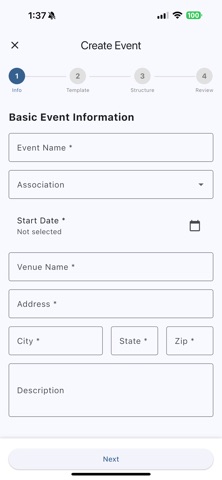
New Features Floor Color System - Added customizable color attribute to event floors (blue, green, white, black, pink, yellow, orange, lavender, beige) - Color picker UI in both add and edit floor dialogs - Colored square icons replace generic floor icons for better visual identification - Default colors automatically assigned based on floor number - Colors preserved in meet import/export functionality Enhanced Navigation & UI - Added Import button alongside Add button in Events screen for easier meet imports - Simplified home screen - removed redundant "New Event" and "Import Meet" buttons (available in Events screen) - Reordered home screen quick actions: Events first, then Judges - Made role-based fee descriptions optional when adding fees Bug Fixes & Improvements Responsive Design - Fixed text clipping issues on small screens across multiple views: - Event Financial Report summary rows - Event Detail action cards - Event Day session cards - Event Session floor cards - Create Event wizard now fully responsive with adaptive layouts - Proper text truncation with ellipsis for long names International Support - Added country selector to event creation address form - Dynamic field labels (State/Province, Zip/Postal Code) based on country - Default to United States but supports 9 countries - Vertical layout for address fields for better consistency Event Structure Cloning - Clone entire event days with optional judge assignments - Clone sessions and floors individually - Improved error handling and user feedback PDF Generation & Sharing - Background processing for better UI responsiveness - File size checks and improved error handling - Enhanced layout and styling for better readability - Loading dialogs to inform users during generation Judge Assignment Enhancements - Apparatus-specific assignments (Vault, Bars, Beam, Floor) - Multi-select functionality for judges - Search capability when assigning judges - Better database schema with apparatus column Technical Updates - Database schema updated to version 6 (floor colors support) - Improved CSV export (removed unnecessary Judge ID column, streamlined expense summary) - Updated meet import/export to include color data - Code cleanup and removal of obsolete test data files
Audience growth
Ratings growth
Baseline captured. Growth appears after the crawler observes a changed rating count.
Momentum comes from crawler snapshots for the tracked storefront. “Viral growth signal” means unusually fast recent rating gains; it is an indicator, not download data.
Price tracking
Price intelligence
First snapshot captured. The trend line starts after the next crawler price observation.
- First observed Aug 19, 2026 · 9:23 AM Free
Screenshots