About this app
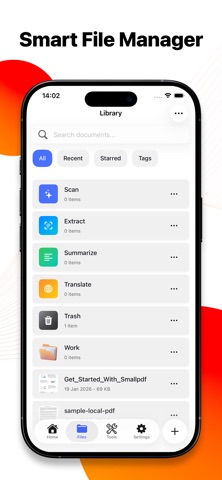
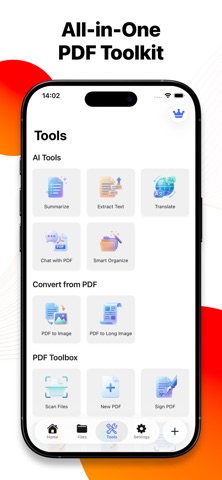
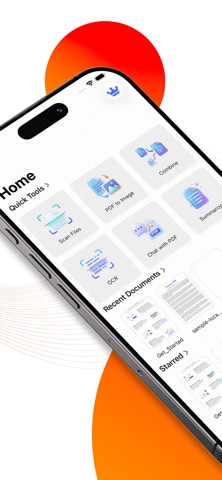
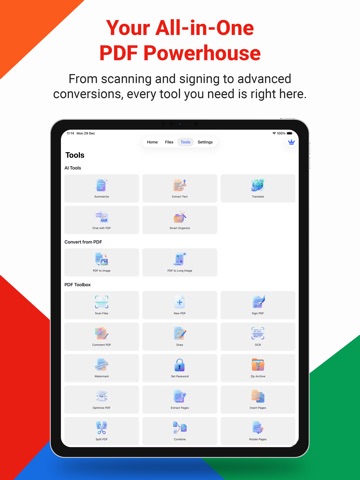
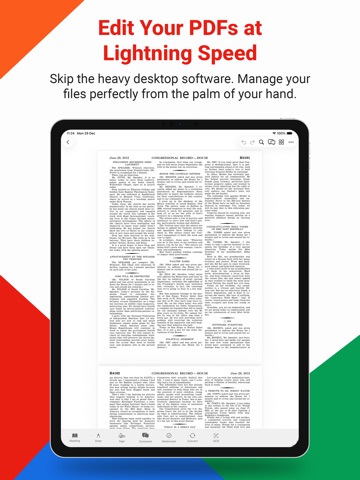
PDF AI – Smart PDF Reader, Scanner & AI Assistant PDF AI brings document management, powerful PDF tools, and advanced AI together in one place — so you can work paperless, faster, and smarter from your iPhone, iPad, and Mac. Read, scan, edit, organize, protect, and interact with PDFs in seconds. With AI-powered chat, summaries, OCR, and smart organization, PDF AI turns your documents into actionable information — wherever you go. AI-POWERED PDF FEATURES • Chat with PDF – Ask questions, get instant answers, and understand documents using AI • AI PDF Summary – Condense long reports, contracts, and articles in seconds • Smart Search – Quickly find text across large PDFs • Translate PDF – Translate entire documents or selected text into multiple languages • Extract Text – Convert PDF content into editable text MOBILE PDF SCANNER & OCR • Scan to PDF – Scan documents, receipts, notes, and photos into high-quality PDFs • Multi-page Scanning – Combine multiple scans into one PDF • OCR Text Recognition – Convert scanned images into searchable and selectable text PDF READER & ANNOTATION • PDF Reader – Open, read, and view PDFs anytime • Comment & Annotate – Highlight text, add notes, draw, and leave comments • Draw on PDF – Mark up documents freely • Bookmark & Navigate – Read comfortably with fast page navigation EDIT, ORGANIZE & MANAGE PDF PAGES • Page Sorting – Reorder PDF pages easily • Insert Pages – Add new pages to existing PDFs • Delete Pages – Remove unwanted pages • Extract Pages – Save selected pages as a new PDF • Split PDF – Break large PDFs into smaller files • Combine PDF – Merge multiple PDFs into one CONVERT & EXPORT • PDF to Image – Convert PDF pages into images • PDF to Long Image – Export entire PDFs as long scrolling images • Import & Share PDFs – Import files and share instantly • ZIP PDF – Compress PDFs into ZIP files SIGN, PROTECT & SECURE • Sign PDF – Create and add electronic signatures • Fill Forms – Complete PDF forms digitally • Set PDF Password – Protect files with passwords • Watermark PDF – Add text or image watermarks to your documents SMART ORGANIZATION • AI Smart Organize – Automatically tag and categorize PDFs • Fast File Search – Find documents instantly • Clean & Structured Workspace – Keep everything organized with minimal effort DESIGNED FOR EVERYONE • Professionals handling contracts, reports, and invoices • Students reading textbooks, research, and lecture notes • Freelancers managing client documents • Anyone who works with PDFs and wants smarter tools powered by AI GO PREMIUM. UNLOCK FULL POWER. Upgrade to PDF AI Premium and get unlimited AI chat, summaries, OCR, advanced editing tools, full scanning features, and complete access to the professional PDF suite. SUBSCRIPTION INFORMATION PDF AI offers auto-renewing subscriptions: • Plans: Monthly or Yearly • Payment: Charged to your Apple ID account • Auto-Renewal: Subscription renews automatically unless canceled at least 24 hours before the end of the current period • Manage Subscription: Via your App Store account settings Privacy Policy: https://homeaidecor.app/privacy.html Terms of Use (EULA): https://www.apple.com/legal/internet-services/itunes/dev/stdeula/
Latest release
What’s New
• Improved app performance and responsiveness • Optimized AI processing and PDF handling experience
Audience growth
Ratings growth
Baseline captured. Growth appears after the crawler observes a changed rating count.
Momentum comes from crawler snapshots for the tracked storefront. “Viral growth signal” means unusually fast recent rating gains; it is an indicator, not download data.
Price tracking
Price intelligence
First snapshot captured. The trend line starts after the next crawler price observation.
- First observed Aug 21, 2026 · 8:17 AM Free
Screenshots