About this app
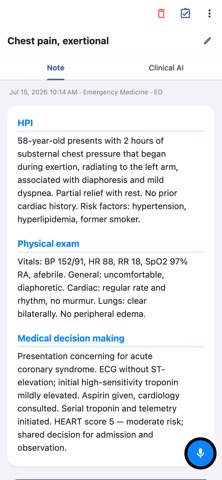
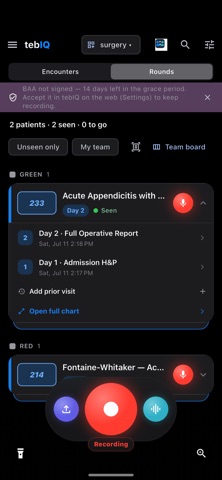
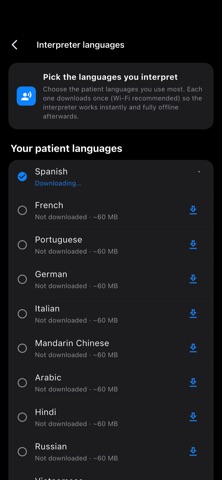
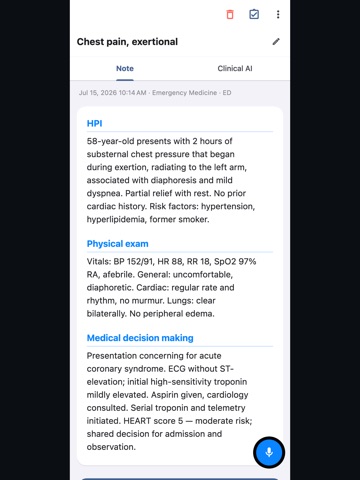
tebIQ is a clinical documentation assistant built by a practicing emergency physician — on shift, between patients — for the clinicians who actually have to write the notes. Most AI scribes transcribe what was said. tebIQ is built around how a clinician works: dictation in, a structured, defensible note out — including the medical decision-making a transcript alone never captures. ROUNDS — ONE RECORDING, SEVERAL PATIENTS Walk the board and dictate. Say "room 4" or "next patient" and tebIQ splits the recording by patient, matches each segment to the right chart, and files a timestamped entry there. Voice never writes unreviewed — each entry lands as a review card you approve on that chart. ADDENDUMS New results, new plan? Tap record, say it, and it appends as a timestamped addendum — your edits untouched. TOOK A SIGN-OUT? Just say it. tebIQ turns a verbal handoff into a clean written sign-out list: one block per patient with what was done, what is pending, what the handing-off doctor is worried about, and the anticipated disposition. SUPERVISING AN NP OR PA? Listen, discuss, and record. tebIQ writes a supervisory attestation: a one-sentence patient summary plus the attestation statement, in your words when you dictate them. THE THINKING COLUMN Beside your note is the tebIQ panel: safety flags, differential, expert consult, billing capture, drug–drug interactions and clinical scores. On premium notes the expert consult arrives already written — no button, no waiting. One tap runs the full Clinical Panel, which also screens the encounter for critical-care eligibility and drafts the attestation for you to confirm. It proposes; you decide. ASK TEBIQ, AND THE GENIE Talk to tebIQ about the patient in front of you — "what am I missing?", "does this MDM support the level I'm billing?" — with the chart in context, on the same reasoning model that writes your notes. The Genie is wired into the app itself: ask for Russian discharge instructions or a critical-care attestation and it does it — showing what it will do and waiting for your yes before it touches the note. CLINICAL SCORES AND CALCULATIONS The panel surfaces the validated scores that fit the presentation — HEART, Wells, PERC, CURB-65, qSOFA and more — computed from what you documented, with every missing input named. Alongside them: corrected sodium, corrected calcium, glucose units and A1c, and pregnancy dating (EDD/EDC, gestational age, estimated date of conception). Pure arithmetic, cited, inserted only when you say so. DIAGNOSIS REFERENCES Every diagnosis in your assessment, plan and differential gets one-tap reference links — UpToDate and OpenEvidence — and every score links to its MDCalc calculator. No searching, no retyping. DISCHARGE HANDOUTS When the note says the patient is going home, the plain-language handout is written for you, ready in the Discharge tab. Available in 14 languages including Spanish, Mandarin, Arabic, Hindi and Russian. PRIVATE BY DEFAULT, AND IT WORKS WHEN THE HOSPITAL WI-FI DOESN'T Privacy Mode keeps transcription on your phone — audio and note never leave the device. No signal? The recording is stored safely on the device and transcribed when you are back. Encrypted in transit and at rest (AES). Never used for training. Never sold. BUILT FOR YOUR SPECIALTY 30+ specialties and 130+ note templates — ED notes, admission H&Ps, progress notes, op notes, consults, discharge summaries and more. Secure the app behind Face ID / Touch ID. FREE TO START Unlimited on-device basic dictation, plus a monthly allowance of premium AI notes. Upgrade for cloud transcription, live streaming, and the full clinical panel. YOU ARE ALWAYS THE CLINICIAN tebIQ supports your documentation; it does not diagnose, treat, or make clinical decisions. You review, edit, and approve every note. tebIQ is intended for use by licensed healthcare professionals. Questions? support@tebiq.com Privacy Policy: https://tebiq.com/privacy Terms of Use: https://tebiq.com/terms
Latest release
What’s New
Note-quality and stability improvements, plus refinements to the note toolbar and finalize flow.
Audience growth
Ratings growth
Baseline captured. Growth appears after the crawler observes a changed rating count.
Momentum comes from crawler snapshots for the tracked storefront. “Viral growth signal” means unusually fast recent rating gains; it is an indicator, not download data.
Price tracking
Price intelligence
First snapshot captured. The trend line starts after the next crawler price observation.
- First observed Aug 19, 2026 · 7:38 PM Free
Screenshots