About this app
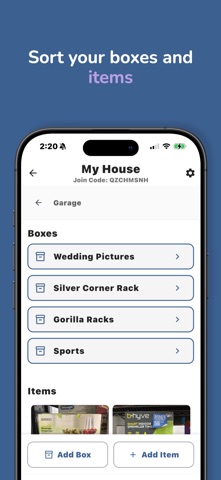
Shelver is your AI-powered home organization assistant designed to help you organize everything in any space, from closets and garages to storage units and houses. So why Shelver? - Shared Spaces: Invite multiple people to access the same inventory. Only the owner needs a subscription and everyone in the space gets the benefits. Each space is organized into locations (rooms / areas in your home), boxes (boxes, drawers, etc), and items (your belongings) - QR codes: Shelver automatically generates QR codes for your boxes so you can scan them and instantly see what’s inside, no opening or digging through bins is required. - AI Vision: Add items by snapping a photo and letting AI automatically tag them for search, or quickly add items using simple text entries. Shelver remembers what you own so you don’t have to. - Universal Search: Not everything in your house is kept in your garage. We have attics, basements, garages, storage closets, and many other rooms. All of these areas can be treated as locations within Shelver, which reside inside of a space. When you search for an item in Shelver, it checks ALL of these spaces and tells you EXACTLY where that item is, so that you don’t have to go looking - Insurance and Peace of Mind: We hope the worst NEVER happens, but sometimes it does. With Shelver, you can add notes and tags to items that could contain price, warranty details, condition, and anything else insurance may require - Realtime Collaboration: Changes in shared spaces sync instantly for everyone, including new items, edits, quantity updates, deletions, and moving boxes or items between locations - Cloud Storage: Your inventory is securely stored in the cloud so it’s always accessible, even if your phone is lost, damaged, or replaced. We don’t sell your data, and everything stays private to your space which also prevents filling up your device storage with thousands of items How to use Shelver: 1. Create a space like a home, apartment, storage unit, or garage - or join someone else’s space with a unique join code. 2. Set up locations such as your kitchen, attic, basement, closet, or garage to fully map what’s under your roof. 3. Add boxes and containers for decorations, sports gear, seasonal items, tools, or family keepsakes. 4. Add items with AI Smart Photos (or simple text entries) - snap a photo of anything, and Shelver’s AI automatically identifies and tags it using multiple search terms for easy retrieval. 5. Find your items instantly by searching item names, boxes, or locations and seeing exactly where everything is stored. 6. Create, print, and scan QR codes for any box to see exactly what's inside. 7. Add notes to any item about price, warranty details, item condition, and more. Declutter and organize in seconds with Shelver. Subscription Tier Limits Shelver has 3 subscription tiers as follows: Basic Limits: - 2,500 items per space - 2 spaces maximum (like a house and a storage unit) - 6 members per space - QR code functionality Plus Limits: - 5,000 items per space - 3 spaces maximum (like a house, an office, and a storage unit) - 8 members per space - QR code functionality Premium Limits: - unlimited items per space - 4 spaces maximum (like a house, a lake house, an office, and a storage unit) - 10 members per space - QR code functionality Try Shelver for free without a trial or credit card info! If you like it, consider subscribing! For additional support, reach out to conyxapp@gmail.com Terms of Use: https://shelver.app/terms Privacy Policy: https://shelver.app/privacy
Latest release
What’s New
Small UI tweaks and updates.
Audience growth
Ratings growth
Baseline captured. Growth appears after the crawler observes a changed rating count.
Momentum comes from crawler snapshots for the tracked storefront. “Viral growth signal” means unusually fast recent rating gains; it is an indicator, not download data.
Price tracking
Price intelligence
First snapshot captured. The trend line starts after the next crawler price observation.
- First observed Aug 24, 2026 · 8:53 AM Free
Screenshots