About this app
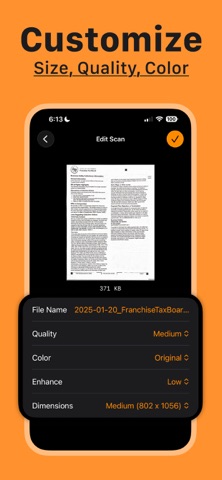
Scanem is a free PDF document scanner for iPhone. Use your camera to scan receipts, notes, and multi-page documents, then adjust the result before saving or sharing it. ■ FEATURES - Scan one or more pages: Capture paper documents with the built-in document camera, then crop or rotate pages as needed. - Adjust your scan: Choose color, grayscale, or black and white, apply enhancement, and set the PDF quality and dimensions. - Control file size: Use lower quality or smaller dimensions when you need a PDF that takes up less space and is easier to share. - Preview and rename: Review the complete PDF, check its file size, and change its name before exporting. - Mark up the document: Use the built-in PDF preview to add markup and make final edits before saving or sharing. - Save or share: Export the PDF to Files, Mail, and other apps. ■ HOW IT WORKS 1. Scan your document with the camera. 2. Review the pages and adjust the PDF. 3. Save it to Files or share it. ■ PRIVATE AND FREE - Your scanned documents are processed on your iPhone and are not uploaded by Scanem. - Every feature is free to use, with no subscriptions, paywalls, or watermarks. Scanem keeps document scanning simple, from the first page to the finished PDF. Terms of Use: - https://scannerapp.notion.site/scan-terms-of-use
Latest release
What’s New
- Choose which folder opens first when saving scans to Files - Added support for 10 new languages - Small improvements & fixes
Audience growth
Ratings growth
Baseline captured. Growth appears after the crawler observes a changed rating count.
Momentum comes from crawler snapshots for the tracked storefront. “Viral growth signal” means unusually fast recent rating gains; it is an indicator, not download data.
Price tracking
Price intelligence
First snapshot captured. The trend line starts after the next crawler price observation.
- First observed Sep 25, 2026 · 6:54 AM Free
Screenshots