About this app
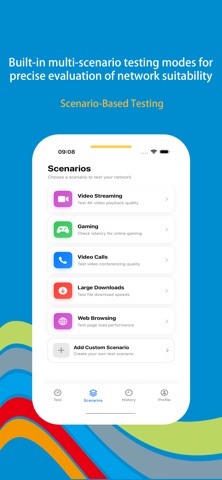
We've meticulously crafted this professional iOS network speed test app to provide you with scientific, comprehensive, and in-depth network performance insights. Every bit transmitted is clearly visible, empowering you to monitor your network status and optimize your connection experience. ## **Core Features: Holistic Network Analysis from Macro to Micro** ### **1. Comprehensive Multi-Dimensional Network Diagnostics** With a single tap, initiate deep testing of critical network performance metrics. We measure not only basic **upload and download speeds** but also delve into **network latency (Ping)**, **jitter**, and **packet loss rate**. This delivers a complete portrait of your network's health, pinpointing the root causes of lag, disconnections, and other issues. ### **2. Universal Network Standard Compatibility Testing** Regardless of your location or connection type, the app delivers precise testing. It fully supports **Wi-Fi**, **5G**, **4G/LTE**, and even earlier cellular standards. By switching between networks for testing, you can effortlessly compare performance, providing critical data for choosing data plans or optimizing network environments. ### **3. Smart History & Data Logging** Every test result is automatically saved, building your personalized network quality profile. Through clear timelines and visual charts, you can track network performance changes over time and locations, monitor long-term trends in carrier service quality, or verify actual improvements after network upgrades. ### **4. Contextual Smart Testing Modes** We understand that different network activities demand distinct performance levels. That's why the app includes multiple **preset testing scenarios** like “Online HD Video Streaming,” “Large-Scale Multiplayer Gaming,” “Video Conferencing,” and “Large File Transfer.” Select a scenario, and the app simulates the corresponding traffic model for testing, providing a clear assessment and recommendation on whether the network is “suitable” for that activity. ### **5. Highly Customizable Professional Testing** To meet the needs of advanced users and professionals, we offer powerful custom testing capabilities. You can freely specify **test servers**, adjust **test duration** and **packet size**, or even create unique combinations of test parameters. This makes the app suitable not only for daily diagnostics but also as a lightweight testing tool for network engineers and developers. ## **Technical Advantages and Design Philosophy** - **Precision and Reliability**: Utilizes industry-standard testing methods to ensure accurate, reproducible data. - **Privacy & Security**: All tests run locally on your device. We never collect or upload any personal network usage data. - **Elegant & User-Friendly**: Designed in line with iOS guidelines, the interface is intuitive and clear. Complex data is visualized through charts for instant comprehension. - **Smart Background Operation**: The app is optimized for efficient, energy-saving testing, minimizing impact on device battery life. --- [Subscription Service] When you subscribe to the "VIP Subscription" service, you will enjoy the following benefits: 1. Unrestricted access to all features. 2. AI content recommendations based on usage habits. Payment for subscriptions is straightforward—the user's iTunes account is credited immediately after confirmation of purchase and payment. Please note that the Apple iTunes account will be automatically debited 24 hours prior to expiration. Upon successful deduction, the subscription term will be extended by one subscription cycle. User Agreement: https://www.wonderda.com/agreement.html Privacy Agreement: https://www.wonderda.com/privacy.html **Download now and start gaining professional insights into every network connection you make.**
Latest release
What’s New
Thanks for staying with us! In this version, you'll find: 1. Added support for multiple device models 2. New Record Deletion Feature 3. Fix bugs
Audience growth
Ratings growth
Baseline captured. Growth appears after the crawler observes a changed rating count.
Momentum comes from crawler snapshots for the tracked storefront. “Viral growth signal” means unusually fast recent rating gains; it is an indicator, not download data.
Price tracking
Price intelligence
First snapshot captured. The trend line starts after the next crawler price observation.
- First observed Aug 10, 2026 · 7:56 AM Free
Screenshots