About this app
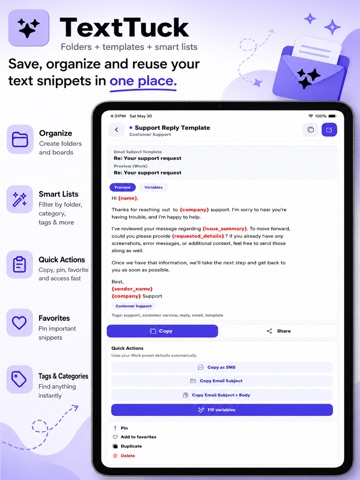
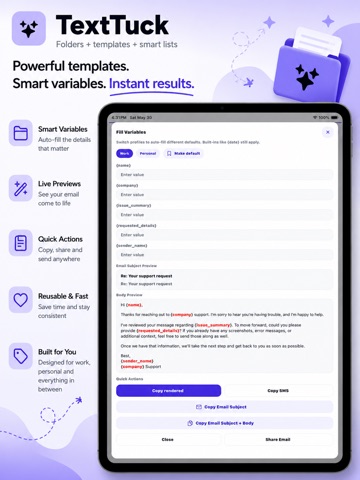
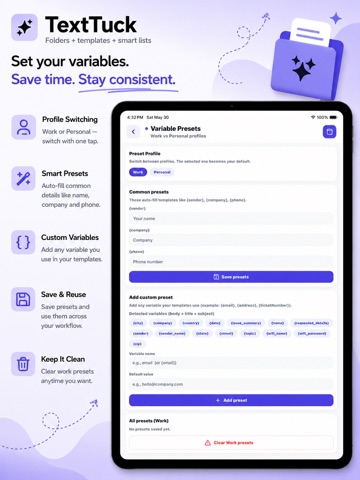
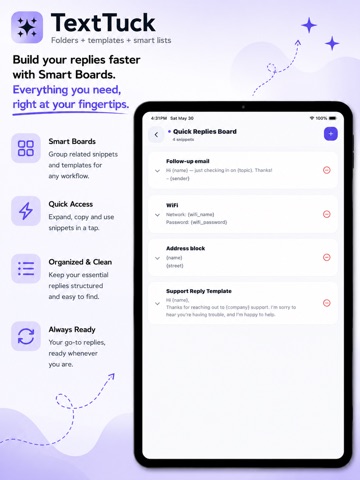
TextTuck – Snippets, Templates & Text Organizer Stop retyping the same messages, emails, replies, code, and notes. TextTuck is the ultimate text organization tool for saving, managing, and instantly reusing your most important content. Whether you're a developer, business professional, content creator, customer support agent, student, or entrepreneur, TextTuck helps you organize everything you write so it's always ready when you need it. Save snippets, templates, prompts, messages, checklists, notes, and reusable content in one secure place. Search instantly, organize with boards and folders, and copy text with a single tap. Powerful Features Snippets & Templates * Save text snippets, templates, notes, and reusable content * Create dynamic templates with variables and placeholders * Support for email templates, SMS messages, support replies, prompts, and more * Favorite frequently used snippets for quick access Boards & Collections * Organize snippets into custom boards and collections * Pin important boards to the top * Use built-in board templates for common workflows * Create dedicated boards for support macros, sales outreach, social media content, project notes, and more Smart Clipboard Capture * Save copied text directly from your clipboard * Optional clipboard suggestions help you quickly turn copied content into reusable snippets * Automatically save content to an Inbox Board for later organization * Convert clipboard history into new snippets with a few taps Advanced Search & Organization * Fast search across snippets, templates, notes, and boards * Organize with tags and categories * Filter and sort content to find exactly what you need * Quickly locate snippets by keyword, tag, board, or category Secure & Professional * Secure fields for sensitive information * Hide passwords, API keys, and confidential values by default * Tap-to-reveal protected content when needed * Copy sensitive values without displaying them on screen One-Tap Productivity * Copy snippets instantly for use in any app * Copy as SMS * Copy email subject lines * Copy complete email subject and body templates * Share snippets with coworkers, friends, or clients Customizable Experience * Light and dark themes * Clean, distraction-free design * Optimized for phones and tablets * Designed for fast access and minimal taps Perfect For: * Business Professionals * Customer support responses * Sales follow-ups * Email templates * Meeting notes * Internal documentation * Internal documentation Developers * Code snippets * Commands and scripts * API requests * Debugging notes * Reusable prompts Content Creators * Social media captions * Hashtags * Content outlines * Video descriptions * Marketing copy Everyday Productivity * Checklists * Personal notes * Frequently used messages * Shopping lists * Study materials TextTuck keeps your most valuable text organized, searchable, secure, and ready to use—so you can work faster, stay consistent, and never lose a great snippet again. Subscription Information Available Subscriptions: • Unlimited Snippets Monthly – 1 Month (auto-renewing) • Unlimited Snippets Yearly – 1 Year (auto-renewing) Subscription pricing varies by region and is displayed in the app before purchase. The exact price shown in your App Store account at the time of purchase will apply. Payment will be charged to your Apple ID account at confirmation of purchase. Subscriptions automatically renew unless canceled at least 24 hours before the end of the current billing period. Your account will be charged for renewal within 24 hours prior to the end of the current period. You can manage and cancel your subscriptions by going to your App Store Account Settings after purchase. Privacy Policy: http://www.epicgeniusllc.com/privacy Terms of Use (EULA): https://www.apple.com/legal/internet-services/itunes/dev/stdeula/
Latest release
What’s New
Minor Bug Fixes
Audience growth
Ratings growth
Baseline captured. Growth appears after the crawler observes a changed rating count.
Momentum comes from crawler snapshots for the tracked storefront. “Viral growth signal” means unusually fast recent rating gains; it is an indicator, not download data.
Price tracking
Price intelligence
First snapshot captured. The trend line starts after the next crawler price observation.
- First observed Sep 16, 2026 · 11:37 AM Free
Screenshots