About this app
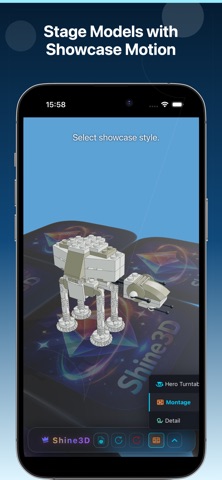
Shine3D is a local-first 3D model viewer and visual capture studio for Apple devices. Open STL, OBJ, GLB, USDZ, STEP, 3MF, and other local 3D files, review them on device, stage them with camera-and-light-driven showcase styles, and capture clean PNG, GIF, and MP4 visuals. Shine3D creates new visual content from your models; it is not a 3D model format converter. Use Shine3D when you want to: • open local 3D files like STL, OBJ, GLB, USDZ, STEP, and 3MF quickly • view and present models with better lighting, camera motion, and staging • switch between Hero Turntable, Montage, and Detail views • capture or record share-ready visuals for product pages, posts, previews, and turntables Why Shine3D is different • Local first: your files stay on device • Broad viewer foundation: common 3D formats open in one local workflow • Premium showcase direction: camera and lighting are tuned for presentation output • Detail viewing: close inspection orbit for surfaces, edges, and top views • Visual capture workflow: PNG, GIF, and MP4 are first-class outcomes • Private by default: no account required for the local workflow Great for • checking local 3D models • product previews • 3D printing models • figures and collectibles • indie assets and portfolio turntables Subscription Terms • Terms of Use (EULA): https://www.apple.com/legal/internet-services/itunes/dev/stdeula/ • Privacy Policy: https://h53d.github.io/s3d/policy.html • Payment is charged to your App Store account. • Auto-renews unless turned off at least 24 hours before the current period ends. • Manage subscriptions in App Store settings. Questions or support: danjian42@gmail.com
Latest release
What’s New
- Recent Files now supports deleting individual entries and clearing the full list in one tap. - Improved the display of glass, water, and similar materials in some GLTF / GLB models. - Added a button to start / stop automatic scene rotation. - Reorganized the material list so similar and related effects are easier to find.
Audience growth
Ratings growth
Baseline captured. Growth appears after the crawler observes a changed rating count.
Momentum comes from crawler snapshots for the tracked storefront. “Viral growth signal” means unusually fast recent rating gains; it is an indicator, not download data.
Price tracking
Price intelligence
First snapshot captured. The trend line starts after the next crawler price observation.
- First observed Aug 8, 2026 · 4:08 PM Free
Screenshots