About this app
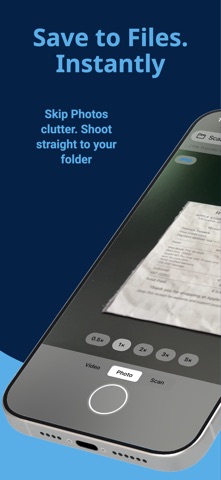
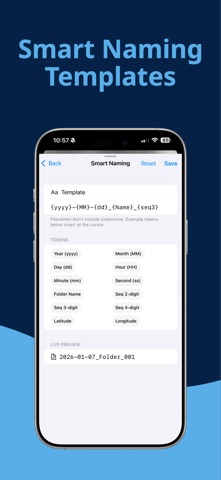
Stop saving everything to Photos. Shot2File saves directly to Files, iCloud Drive, and OneDrive. Choose a folder once, then capture photos, videos, and scans that land exactly where you want them — fast, clean, and organized. Built for a faster workflow: - Save directly to Files, iCloud Drive, or OneDrive - Smart Naming with 21 tokens — date, time, place, device, EXIF, sequence, and more - Optional Auto-Sort into Year / Month / Day folders - Photo, Video, and Scan in one simple camera - Quick Reveal in Files and easy sharing - Volume buttons as shutter (optional) Pro camera control Tap to focus and meter. Long-press to lock AE/AF and drag the reticle handle to bias exposure exactly where you want it. Lens chips are labeled (Ultra-Wide, Wide, Tele) so you always know which one is active. Self-timer (3s / 10s) and expanded grids — rule of thirds, square, golden spiral, and diagonals — for cleaner framing. Powerful scanning Create multi-page PDFs with color, grayscale, or black-and-white modes, plus DPI and margin controls. Pro unlocks on-device OCR with multi-language detection so the text inside scanned pages is searchable in Files, Preview, and Spotlight. Better capture control Choose photo format (JPEG/HEIC) and quality. Record video with stabilization. Pro unlocks up to 4K/60 video with full stabilization control. Smart Naming Build any filename pattern with tokens for date, time, weekday, place (reverse-geocoded city), device model, image dimensions, ISO, aperture, shutter speed, GPS, sequence numbers, and more. Live preview while you type. Bulk Rename (Pro) Rename existing photos, videos, and PDFs in any folder using your current template — with one-tap undo. OneDrive that just works Upload to OneDrive Personal or Business. If your network drops mid-upload, Shot2File queues the file and finishes it the moment connectivity returns. Made for frequent use Pin favorite folders for one-tap saving. Free includes 1 Favorite. Pro unlocks unlimited Favorites. Use Siri or the Action Button to launch straight into the camera or scanner — no menus, no app picker. Spotlight indexes each capture action, so you can search "take a photo" and shoot. Try Pro Get a 15-minute Pro preview. Additional Favorites require permanent Pro.
Latest release
What’s New
Folder Reliability — Fixed an issue where saved folders could appear as "not found" after restarting the app. Bookmarks now auto-refresh silently. Onboarding Fix — The "Get Started" button now works every time, even if you haven't selected a folder yet. Better Error Messages — Folder access errors now tell you exactly what to do instead of showing a generic message. Bug Fixes & Polish — Fixed GPS metadata timestamps, improved ad sizing on smaller screens, removed redundant status messages during recording, and cleaned up under the hood.
Audience growth
Ratings growth
Baseline captured. Growth appears after the crawler observes a changed rating count.
Momentum comes from crawler snapshots for the tracked storefront. “Viral growth signal” means unusually fast recent rating gains; it is an indicator, not download data.
Price tracking
Price intelligence
First snapshot captured. The trend line starts after the next crawler price observation.
- First observed Sep 7, 2026 · 1:31 AM Free
Screenshots