About this app
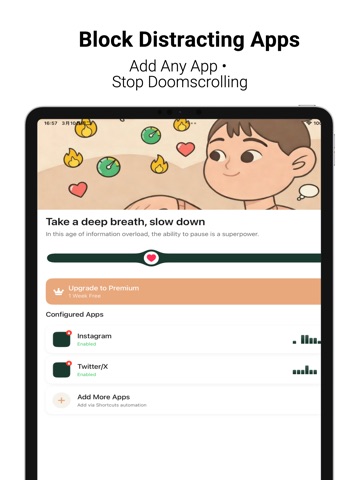
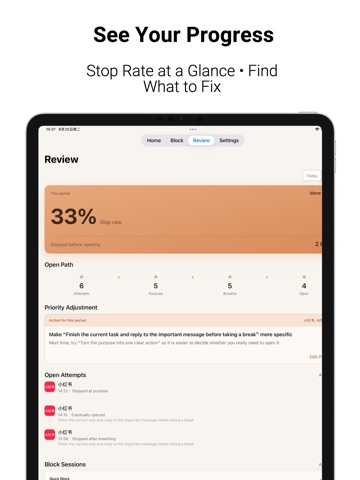
Pause the impulse. Block the distraction. Review what works. Focus Pause gives you two levels of protection for a healthier relationship with your phone. Add a mindful pause before an impulsive open, or actively block distracting apps when you need a firmer boundary. CHOOSE THE RIGHT LEVEL • Pause before opening: use iOS Shortcuts to start a breathing and purpose check when you open a distracting app. • Quick Timer: block selected apps and categories for 15, 30, 60 minutes, or a custom duration up to 24 hours. • Schedules: automatically block distractions during work, study, sleep, or personal time, including all-day and overnight periods. REVIEW AND ADJUST • See whether you stopped or continued after the opening pause. • Review open paths, stop rate, recent sessions, and risky app-purpose combinations. • Review completed, ended-early, and interrupted block sessions. PRIVATE AND FLEXIBLE • Select apps and categories with Apple’s Screen Time controls. • Active timers and schedules work together without removing each other’s protection. • Your focus records stay on your device. The developer does not collect personal data. • Blocks can be ended after confirmation; Focus Pause does not claim to be uninstall-proof or a strict mode. FREE & PREMIUM The free version includes the pause flow for up to 2 apps, Quick Timer, and the first 2 schedules with one active day each. Premium unlocks unlimited protected apps, schedules, active days, custom purposes, breathing options, and deeper review insights. Choose monthly, yearly, or Lifetime Premium. Monthly and yearly plans renew automatically unless canceled at least 24 hours before the current period ends. Lifetime Premium is a one-time purchase and does not automatically cancel an existing subscription. Terms of Use: https://focuspause-privacy.pages.dev/terms Privacy Policy: https://focuspause-privacy.pages.dev/
Latest release
What’s New
Focus Pause 1.4.1 makes the app easier to use in more languages. • Added German, Spanish, French, Italian, Japanese, Korean, Romanian, Russian, Vietnamese, and Traditional Chinese • Improved localization consistency across the main app, Screen Time reports, blocking screens, and Shortcuts • Refined language switching, accessibility labels, and layout reliability • Included additional stability improvements
Audience growth
Ratings growth
Baseline captured. Growth appears after the crawler observes a changed rating count.
Momentum comes from crawler snapshots for the tracked storefront. “Viral growth signal” means unusually fast recent rating gains; it is an indicator, not download data.
Price tracking
Price intelligence
First snapshot captured. The trend line starts after the next crawler price observation.
- First observed Sep 4, 2026 · 1:44 AM Free
Screenshots