About this app
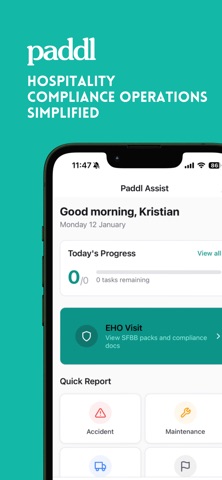
Your daily operations, sorted. Paddl Assist puts everything your hospitality team needs in one place. Complete tasks, report issues, access procedures, and stay compliant—without the paperwork chaos. ASK PADDY - YOUR AI ASSISTANT Got a question? Ask Paddy. From allergen queries to procedure questions, Paddy searches your business knowledge and gives you instant, accurate answers—24/7. No more waiting for a manager or flicking through folders. DAILY TASKS Open your shift to a clear list of what needs doing. Temperature checks, cleaning routines, delivery inspections—tick them off in seconds, not minutes. Out-of-range readings get flagged automatically. QUICK REPORTING Accident? Maintenance issue? Delivery problem? Report it instantly with photos and notes. No more lost paper forms or forgotten incidents. KNOWLEDGE AT YOUR FINGERTIPS Stop interrupting your manager with questions. Search procedures, allergen info, and safety guidelines instantly. The answer's always there when you need it. EHO READY See your compliance status at a glance. SFBB packs, temperature records, training sign-offs—everything organised for when the inspector walks in. TRAINING & DOCUMENTS Sign off on training, view your certificates, and keep your personal documents in one place. Know exactly what's due and what's done. WORKS OFFLINE Poor wifi in the kitchen? No problem. Complete tasks offline and sync when you're back online. BUILT FOR HOSPITALITY We know you're busy. That's why every feature is designed for 30-second interactions—not desktop software squeezed onto a phone.
Latest release
What’s New
- Number fields accept decimals again - Shared tablets no longer sign themselves out after 15 minutes idle - Typing now counts as activity - The last shift's handover reaches the next one - An unread handover stays on the home screen - Read back past shift handovers from Reports - Task history screen for reviewing past days - View photos uploaded against a task - Submitted reports show a "Resolved" status and a confirmation badge
Audience growth
Ratings growth
Baseline captured. Growth appears after the crawler observes a changed rating count.
Momentum comes from crawler snapshots for the tracked storefront. “Viral growth signal” means unusually fast recent rating gains; it is an indicator, not download data.
Price tracking
Price intelligence
First snapshot captured. The trend line starts after the next crawler price observation.
- First observed Sep 7, 2026 · 12:43 AM Free
Screenshots