About this app
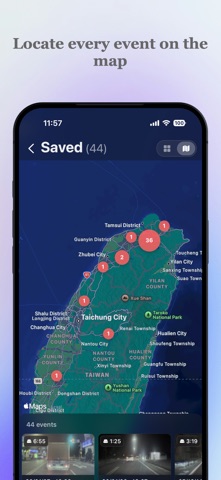
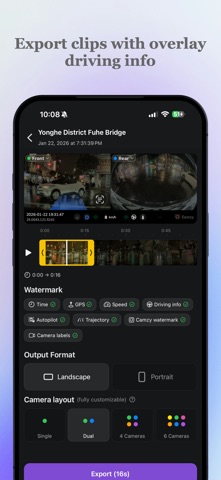
Camzy — The Ultimate Tesla Dashcam Player. A comprehensive tool designed specifically for TeslaCam. TeslaCam is a powerful feature, but reviewing and organizing footage can be slow and cumbersome—especially when you need to "find that key moment" quickly. Camzy enables you to view, organize, back up, and export Sentry Mode and Dashcam clips faster than ever on your iPhone. Handle every incident with a more intuitive workflow. Whether you're saving critical evidence, filing a police report, or submitting an insurance claim, Camzy helps you prepare your video documentation with maximum efficiency. Core Highlights ◎ Premium Tesla Dashcam Player Supports synchronized playback of all 6 camera angles along with a driving data dashboard. Get the full picture with a more intuitive and seamless viewing experience. ◎ Map-Based Event Browsing Locate specific clips instantly using the integrated map view. Find the exact footage you need at a glance with clear spatial information. ◎ Instant Jump to Events Skip straight to the critical moment with a single tap. No more endless scrubbing through timelines. ◎ Batch Backup & Delete Save multiple clips at once or quickly clear out old files to save massive amounts of time. ◎ Smart Event & File Management Browse and organize footage by event type (Sentry or Dashcam), making your library much easier to navigate. ◎ Export with Data Overlays Export key clips with synchronized timestamps and driving data watermarks for more professional and complete documentation. ◎ Save to Camera Roll Easily copy important TeslaCam videos directly to your phone for quick backups and easy sharing. Privacy policy: https://camzy.32tech.co/privacy-policy Terms of Use (EULA):https://www.apple.com/legal/internet-services/itunes/dev/stdeula Camzy is a third-party application and is not affiliated with, endorsed by, or sponsored by Tesla, Inc.
Latest release
What’s New
• New: Option to hide the rear license plate when exporting • New: Export settings are remembered (overlays, layout and orientation) • Improved: Jumping to an event now starts 3 seconds earlier and pauses, so you see the whole incident • Improved: Smoother, more stable USB playback
Audience growth
Ratings growth
Baseline captured. Growth appears after the crawler observes a changed rating count.
Momentum comes from crawler snapshots for the tracked storefront. “Viral growth signal” means unusually fast recent rating gains; it is an indicator, not download data.
Price tracking
Price intelligence
- First observed Aug 14, 2026 · 12:19 AM Free
Screenshots