About this app
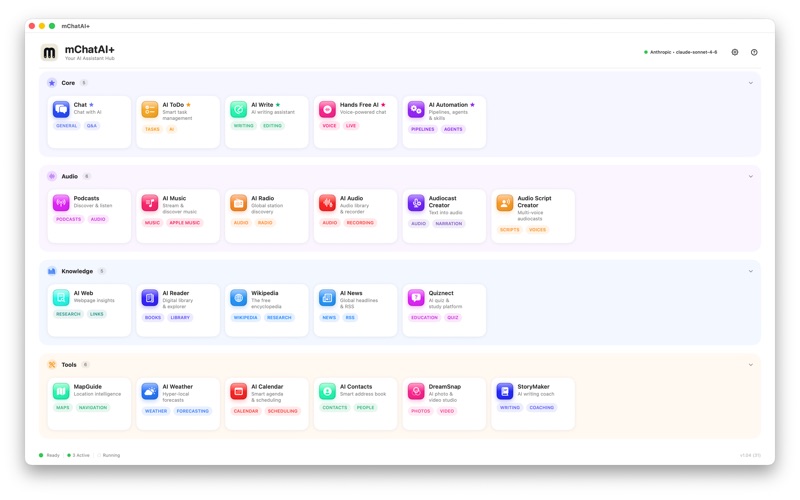
mChatAI+ is a native Mac workspace for using AI across everyday tasks, writing, audio, research, and repeatable workflows. Chat and write Start with Chat for questions, planning, brainstorming, and document-aware help. Use AI Write to draft, rewrite, summarize, polish, and dictate text. StoryMaker adds a structured space for outlines, chapters, characters, and longer creative projects. Tasks and daily organization AI ToDo helps organize projects, break down tasks, and track progress. For You surfaces useful recent activity and suggestions from the applets you use, so it is easier to return to music, reading, research, notes, and open work. Audio, music, and voice mChatAI+ includes a broad audio toolkit: Hands Free AI for voice conversations, AI Audio for recording and transcription, AI Music for listening and discovery, Podcasts for finding and playing shows, AI Radio for live stations, plus Audiocast Creator and Audio Script Creator for turning text into spoken audio. Research and reading Summarize webpages, browse AI News, search Wikipedia, and use AI Reader for books, articles, and audiobooks. Keep useful findings, summaries, and generated results in one workspace. Visual workflows AI Automation lets you build reusable AI workflows from skills and steps. Use it for repeatable writing, research, file, audio, and productivity tasks without rebuilding the same prompt every time. Creative tools DreamSnap, Image Studio, Icon Maker, and Quiznect help with visual ideas, icons, study material, quizzes, and creative exploration. mChatAI+ is built for people who want a practical AI command center on their Mac: chat, writing, audio, music, research, tasks, and automation in one native app.
Latest release
What’s New
Welcome to mChatAI+ for Mac. This release brings together Chat, AI Write, AI ToDo, For You, and visual AI Automation in one native Mac workspace. It also includes the mChatAI+ audio toolkit: Hands Free AI, AI Audio, AI Music, Podcasts, AI Radio, Audiocast Creator, and Audio Script Creator. Additional applets include webpage summaries, AI Reader, Wikipedia, AI News, DreamSnap, StoryMaker, Icon Maker, Quiznect, Calendar, Weather, and Contacts, plus general reliability and interface polish throughout the app.
Audience growth
Ratings growth
Baseline captured. Growth appears after the crawler observes a changed rating count.
Momentum comes from crawler snapshots for the tracked storefront. “Viral growth signal” means unusually fast recent rating gains; it is an indicator, not download data.
Price tracking
Price intelligence
First snapshot captured. The trend line starts after the next crawler price observation.
- First observed Aug 7, 2026 · 10:24 PM Free
Screenshots