About this app
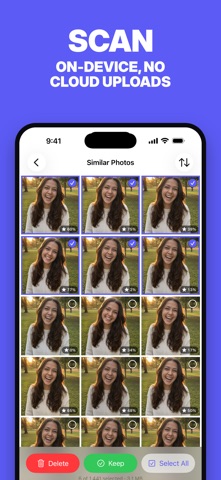
PhotoBroom intelligently finds duplicate and similar photos cluttering your iPhone or iPad - then helps you clean them up in seconds. YOUR PHOTOS STAY PRIVATE PhotoBroom processes your photos and videos entirely on your device. No media is uploaded to the cloud. No account required. Just you and your library. HOW IT WORKS 1. Scan - PhotoBroom analyzes your library using advanced on-device machine learning 2. Review - Browse through groups of similar photos with an intuitive swipe interface 3. Clean - Keep your favorites, remove the rest with a single tap SMART DUPLICATE DETECTION PhotoBroom doesn't just find exact copies. Its intelligent algorithm detects: - Near-identical shots taken moments apart - Similar selfies and portraits - Photos with minor differences SEVEN CLEANUP CATEGORIES - Similar Photos - duplicate and near-duplicate detection - Swipe to Clean - flick through your whole library card by card, swipe right to keep, left to delete - Screenshots - dedicated tile so you can clear them in bulk - Low Scored Photos - on-device AI rates every photo and surfaces your weakest shots, worst first, with an adjustable sensitivity - Screen Recordings - clear out long screen captures in one place - Large Videos - sorted by size with a configurable threshold - Short Videos - clips below a length you choose (Live Photos excluded automatically) QUALITY-SCORED REVIEW Each photo gets an on-device quality score using Apple's Vision framework. The best photo in every group is highlighted gold and pre-selected, so the obvious choice is one tap away. POWERFUL FEATURES - One-Tap Cleanup: Select the best photo, automatically remove the rest - Visual Comparison: Zoom and pan to spot differences between photos - Fast Review Mode: Quickly skip through groups when cleaning large libraries - Customizable Sensitivity: Adjust how strict the duplicate matching should be - Space Calculator: See how much storage you can potentially recover - Incremental Scanning: Only processes new photos on subsequent scans PHOTOBROOM PRO Every tool above is free to use: scan your whole library, browse every category, and clean up to 50 items a day, plus 2 large videos — no account, no ads to watch. PhotoBroom Pro removes the daily limits, with a subscription or a one-time lifetime purchase: - No daily limits — clear your whole backlog in one go - Auto-Process All Groups: keeps the top-scored photo in every group and deletes the rest in a single batch - No ads, no third-party SDKs in your photo pipeline DESIGNED FOR YOUR WORKFLOW - Swipe between photos in each group - Pinch to zoom for detailed inspection - Navigate between groups effortlessly - Skip groups you want to review later - All deletions require your confirmation BUILT WITH PRIVACY IN MIND - On-device machine learning (Apple Vision) - Your photos and videos never leave your device - No cloud uploads of your media - No account or sign-up needed STORAGE YOU CAN RECLAIM Duplicate photos can consume gigabytes of precious storage. PhotoBroom helps you identify and remove them, freeing up space for what matters - new memories. Perfect for: - Photographers with lots of similar shots to sort - Anyone with years of accumulated photos - Users running low on iCloud or device storage - Privacy-conscious individuals Clean your photo library the smart way. Download PhotoBroom today. Terms of Use (EULA): https://www.apple.com/legal/internet-services/itunes/dev/stdeula/
Latest release
What’s New
- Keeping one photo from a group of similar shots now sticks. That photo stays out of later cleanup suggestions instead of coming back. - We squashed some pesky bugs and polished performance and stability.
Audience growth
Ratings growth
Baseline captured. Growth appears after the crawler observes a changed rating count.
Momentum comes from crawler snapshots for the tracked storefront. “Viral growth signal” means unusually fast recent rating gains; it is an indicator, not download data.
Price tracking
Price intelligence
First snapshot captured. The trend line starts after the next crawler price observation.
- First observed Aug 23, 2026 · 1:06 PM Free
Screenshots