About this app
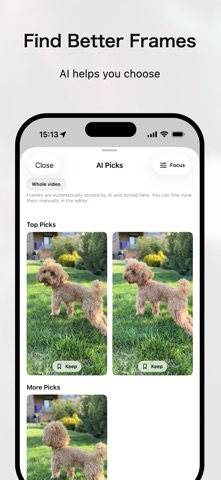
Capture the best moment in your everyday videos—beautifully, as a photo. KeeperTake is a dedicated app for extracting still images from video. Instead of worrying about screenshot timing, you can step frame by frame and save only the best shot. AI Picks also suggests good candidates, so you spend less time searching. #### Why extract from video? * Turn time-consuming videos into photos you can review instantly * Save only the moments you need, making it easier to look back and share * Keep the best moments without re-watching the whole video #### What you can do * Frame-by-frame precision Roughly find the moment on the timeline, then fine-tune frame by frame. Avoid closed eyes, blur, and awkward expressions—and pick the perfect frame. * AI Picks suggestions AI suggests candidates from your video to guide you toward highlights. Start from choosing, not endless scrubbing. * Keeps to collect and compare Save frames you want to keep in Keeps, then compare and decide faster. * Batch export Once you’ve picked your favorites, export multiple photos at once. Great for extracting several shots from a single video. #### About image quality KeeperTake exports still photos from video frames (including high-resolution videos like 4K). Compared to screenshots, this can be beneficial because: * Exports the original video frame instead of what happens to be on screen * Keeps UI elements out of your photo, saving only the moment you want Note: * Results depend on the source video quality, compression, and capture conditions. * In some cases, the difference vs. screenshots may be small. #### Recommended for * Capturing changing expressions of babies and kids * Freezing a fast moment from pets * Sports and dance highlight moments * Picking the best shots later from travel and everyday videos * Creating thumbnails and assets from video #### Privacy Video analysis and photo export are completed on your device. #### Pro (one-time purchase) KeeperTake is free to try. Pro is a one-time purchase—no subscription. Pro unlocks: * Focus Scan Rescan only the range you care about to refine AI Picks. * Higher Keeps limit Save and compare more candidates. * Batch export Select multiple Keeps and export them in one go. * Export options Adjust quality, format (HEIC/JPEG), and metadata. * Lifetime Pro One purchase unlocks Pro forever. You can check the differences between the free and Pro versions in the in-app purchase screen. #### Terms of Service https://www.codepaint.app/terms-keepertake #### Privacy Policy https://www.codepaint.app/privacy-policy-keepertake
Latest release
What’s New
Performance improvements
Audience growth
Ratings growth
Baseline captured. Growth appears after the crawler observes a changed rating count.
Momentum comes from crawler snapshots for the tracked storefront. “Viral growth signal” means unusually fast recent rating gains; it is an indicator, not download data.
Price tracking
Price intelligence
First snapshot captured. The trend line starts after the next crawler price observation.
- First observed Aug 10, 2026 · 5:17 PM Free
Screenshots