About this app
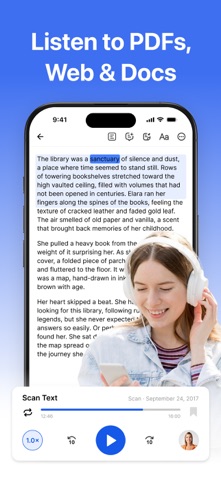
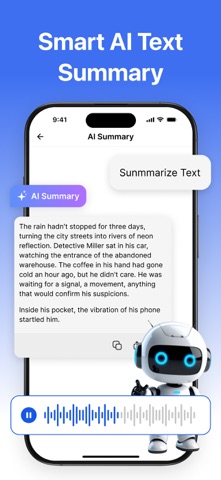
Efficiently convert text to speech, making reading and listening effortless. This application is an all-in-one tool combining text-to-speech conversion, content organization, and multi-language support, designed to help users access and manage information more efficiently across various scenarios. Whether it’s documents, web pages, or impromptu text snippets, any content can be quickly transformed into audio ready for listening. Features Multiple Content Import Methods - Supports importing various common file formats for easy document reading. - Supports importing scanned documents, converting paper-based content into readable text. - Supports importing web content, allowing you to listen directly to online articles. - Supports manual text input to quickly generate speech audio. Natural and Fluid Voice Narration - Supports languages from numerous countries and regions worldwide. - Reading speed can be adjusted according to personal preference to enhance reading efficiency. - Offers a variety of voice options (specific available voices are subject to what is displayed within the app interface). Intelligent Reading Assistance - Provides text highlighting and content overview features to help users quickly grasp key information. - Supports note-taking functionality for easy recording and review at any time. - Supports adjusting font size and switching reading modes to suit different reading environments. Reading Progress Management - Features a list-based management interface that clearly presents your reading content. - Automatically tracks your reading progress and status, ensuring a seamless continuation of your reading sessions. Multi-Language and Content Expansion Features - Supports text translation functionality to facilitate the understanding of multi-language content. - Supports generating expanded audio content (such as podcast-style presentation audio) based on text input. Ideal Users - Users who prefer to acquire information through a combination of "listening" and "reading." - Users currently learning a foreign language or those who need to process multi-language content. - Users in situations where reading is inconvenient but listening is suitable (e.g., during commutes or while exercising). Important Notes: - The AI-assisted features within this application are intended solely to enhance the reading experience and comprehension efficiency; they should not be used as a substitute for professional advice. - For specific details regarding supported languages, voice options, and features, please refer to the actual information displayed within the application. Subscription : Payment will be charged to your Apple ID account at the confirmation of purchase. Subscription automatically renews unless auto-renew is turned off at least 24 hours before the end of the current billing period. Your account will be charged for renewal within 24 hours prior to the end of the current period, and identify the cost of the renewal. Subscriptions may be managed by the user and auto-renewal may be turned off by going to the user's Account Settings on the App Store after purchase. Any unused portion of a free trial period, if offered, will be forfeited when the user purchases a subscription to that publication, where applicable. Privacy Policy: https://tts.firepk.com/privacy User Agreement: https://tts.firepk.com/terms
Latest release
What’s New
What’s New This update makes reading and listening smoother, smarter, and more natural. • Improved the overall reading and audiobook experience • Enhanced AI voice playback quality • Added timed playback, improved text formatting cleanup, and reduced interference from special symbols • Optimized the mini player, making it easier to listen while doing other things • Fixed known issues and improved app stability
Audience growth
Ratings growth
Baseline captured. Growth appears after the crawler observes a changed rating count.
Momentum comes from crawler snapshots for the tracked storefront. “Viral growth signal” means unusually fast recent rating gains; it is an indicator, not download data.
Price tracking
Price intelligence
First snapshot captured. The trend line starts after the next crawler price observation.
- First observed Aug 12, 2026 · 11:21 PM Free
Screenshots