About this app
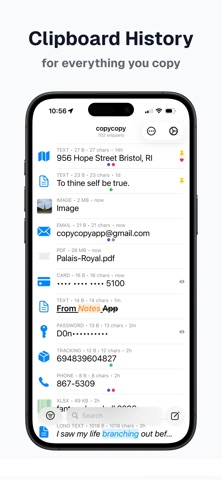
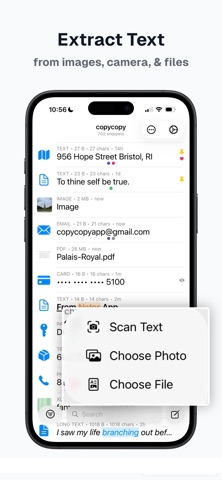
copycopy is a completely local, subscription-free clipboard manager that saves the text, images, and files you copy so you never lose what matters. How It Works Copy something, and copycopy saves it. Use the copycopy keyboard, open the app, or set up Quick Capture to save your clipboard with Back Taps, the Action Button, or Control Center. No need to open the app or switch keyboards. Your Clipboard Companion Keep copycopy open on your iPhone while you work on your Mac or iPad. Browse, search, and filter your full clipboard history, then tap any item to copy it. With Universal Clipboard, it's instantly ready to paste on your other Apple device. Smart Detection copycopy automatically recognizes phone numbers, emails, URLs, addresses, tracking numbers, dates, passwords, credit cards, and code snippets. Tap for instant actions: call, message, open a link, track a package, or navigate to an address using your preferred apps. Rich Text & Formatting copycopy preserves rich text formatting: bold, italic, colors, and more. Paste back into Notes, Mail, or any app with formatting intact. Prefer plain text? Make it your default and reach rich text from the item menu, or strip formatting from any single item with one tap. Files & Documents Save PDFs, documents, and other files alongside your text and images. Files arrive with thumbnails, and the text inside PDFs becomes searchable. Text Transforms Transform copied text instantly: uppercase, lowercase, title case, URL encode/decode, Base64 encode/decode, strip HTML, remove line breaks, trim whitespace, and JSON format or minify. Copy the result or save it as a new item. Stay Organized Pin important items to the top. Mark items as Keepers so they're never auto-deleted. Add custom color-coded tags to organize your way. Combine filters to narrow by type, status, and tag at once. Sort by date, how often you copy something, name, size, or character count, and tap the same option again to reverse it. Or arrange your list by hand and keep it that way. Search your entire history with in-app and Spotlight search. Bulk Editing Select multiple items to tag, pin, rename, combine, transform, compress images, or delete in bulk. Scan & Capture Use the built-in camera to scan text from documents, signs, or anything in the real world. Drag and drop text or images directly into copycopy. Import photos from your library. Your Keyboard, Your Clipboard The copycopy keyboard gives you direct access to your clipboard history inside any app. Tap to paste, filter by type, and take actions, all without leaving what you're doing. 100% Private Your data never leaves your device. That includes the AI: copycopy can name your snippets and describe your images, and every bit of it runs on this device. Each AI feature starts switched off, and you can tell copycopy to leave any item alone. No accounts, no cloud sync, no analytics, no tracking, not even crash reporting. Lock the app behind Face ID or Touch ID. Passwords and credit cards are automatically hidden from Spotlight and the keyboard. Choose how quickly sensitive copies clear from the system clipboard, and how long saved cards are kept. Choose Your Default Apps Set your preferred apps for messaging, maps, email, browsers, and calendars, plus your preferred search engine. copycopy opens detected content in the apps you actually use. Backup & Restore Schedule automatic backups so your library is saved without you thinking about it, or export any time. Backups include your images, files, and formatting, and you can also export as JSON or CSV. Import or restore on another device to pick up right where you left off. Free to Start Your first 8 items are free with full functionality. Upgrade once to unlock up to 1,000 items. No subscription.
Latest release
What’s New
Local AI, on your device (nothing sent to the cloud). copycopy can now name your snippets and describe your images so you can find them later. It runs entirely on this device, nothing is sent anywhere, and every AI feature starts switched off. Do not automatically name. Tell copycopy to leave any item alone, one at a time or in bulk. It forgets what it guessed and keeps what it read, so the item stays searchable without being named. Files are named from what is inside them, not from a filename. Settings rebuilt: fewer taps to everything, and hopefully clearer explanations. Fixed: turning off Clipboard Monitoring now genuinely stops copycopy reading the clipboard. Fixed: keyboard setup now shows the real steps for adding the keyboard the first time.
Audience growth
Ratings growth
Baseline captured. Growth appears after the crawler observes a changed rating count.
Momentum comes from crawler snapshots for the tracked storefront. “Viral growth signal” means unusually fast recent rating gains; it is an indicator, not download data.
Price tracking
Price intelligence
First snapshot captured. The trend line starts after the next crawler price observation.
- First observed Sep 1, 2026 · 2:55 PM Free
Screenshots