About this app
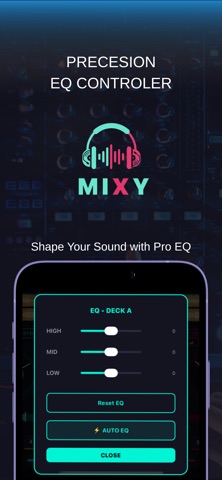
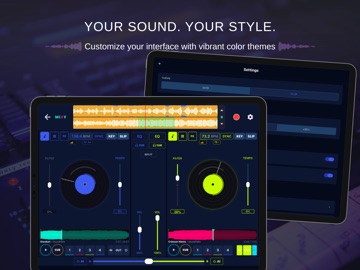
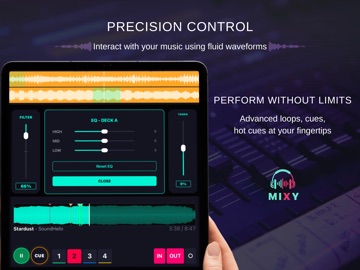
Turn your device into a complete music production studio. MIXY STUDIO is the all-in-one app for DJs, producers, and music lovers who want to mix, scratch, remix, produce beats, and perform — all from one seamless interface. Whether you're automixing a playlist for a party, scratching over a live set, or producing your next track, Mixy Studio has the pro tools to make it happen. ▶ AUTOMIX (NEW) Let AI handle your transitions. • Phrase-Aware Transitions: Crossfades at the end of 8 or 16-bar phrases for seamless, musical mixes. • Drop-Seek: Auto-cues the incoming track to its highest-energy moment. • Transition Styles: Linear, Curve, or Hard Cut crossfader shapes. • Auto EQ Swap: Smoothly swaps bass between tracks mid-crossfade. • Harmonic Key Matching: Prevents clashing keys automatically. • Energy Gating: Defers transitions when energy levels don't match. • Waveform Overlay & Countdown Ring: See exactly when and where the next mix hits. ▶ EASY MODE (NEW) Simplified DJ layout for beginners. Clean Volume + Filter sliders, bigger buttons — perfect for parties. ▶ THE PRODUCER WORKFLOW • Live Instruments: Play melodies on the virtual keyboard. Overdub synths and pianos onto your beats. • Global Sequencer: Navigate DJ Mixer, Beatmaker, and Instruments while loops stay locked in sync. • Studio Mixdown: Record your full jam session into a high-fidelity WAV file. • DAW Stem Export (PRO): AirDrop AI Stems directly to your Mac for any DAW. ▶ AI STEM SEPARATION • On-Device AI: Isolate Vocals, Drums, Bass, and Other — 100% offline, no cloud needed. • Individual stem volume sliders for real-time mix control. • One-tap Acapella and Instrumental modes. • Batch Processing: Separate your entire library automatically. ▶ BEATMAKER SUITE • 16-Step Sequencer and 4×4 responsive drum pads. • Polyphonic engine with zero-latency triggering. ▶ DUAL DECK DJ MIXING • Two independent decks with vertical volume faders and adjustable crossfader. • Physics-based vinyl scratching with inertia and brake effects. • Energy Level Detection (1–5) and haptic feedback on all controls. ▶ AUDIO ANALYSIS & SYNC • Smart BPM Detection with beat grid and manual tools. • Harmonic Key Detection (Camelot System). • Auto Gain and Auto EQ for consistent, balanced sound. ▶ PRO MIXING CONTROLS • 3-Band EQ with kill, HP/LP filters with resonance. • Split Audio Output for pre-fader headphone monitoring. ▶ PERFORMANCE TOOLS • 8-pad grid: Hot Cues, Loops, Hot Loops, Loop Rolls, and Sampler SFX. • Slip Mode: Scratch and loop while the track plays silently underneath. • 12 stackable effects: Echo, Reverb, Flanger, Phaser, Bitcrush, and more. • Noise & Build-Up FX for club-ready sweeps and transitions. ▶ RECORD YOUR SETS Capture live DJ mixes and studio sessions. Export and share high-quality audio. Localized in English, Spanish, French, and German. Optimized for iPhone and iPad. Download MIXY now and start creating. Terms of Use: https://www.apple.com/legal/internet-services/itunes/dev/stdeula/
Latest release
What’s New
AUTOMIX — Your AI DJ Co-Pilot Sit back or stay in control. Automix now delivers phrase-aware transitions that crossfade at the end of 8 or 16-bar phrases for truly seamless mixes. • Drop-Seek: Incoming tracks auto-cue to their highest-energy moment. • Transition Styles: Linear, Curve, or Hard Cut crossfader shapes. • Auto EQ Swap: Bass frequencies swap smoothly between tracks. • Harmonic Key Matching: Prevents clashing keys automatically. • Energy Gating: Skips transitions when energy levels don't match. • Visual Waveform Overlay & Countdown Ring on the Automix button. • Manual Skip: One tap to force the next transition. EASY MODE A brand new simplified layout — perfect for parties and beginners. Clean Volume + Filter sliders, bigger buttons, and zero clutter. STUDIO ENHANCEMENTS • Improved sequencer and instrument navigation. • Bigger tap targets for Hot Cues, Play, and CUE buttons (44pt). • Filter slider now works even with no track loaded. FIXES • Emergency transition fallback prevents dead air at end of tracks. • Fixed touch overlap issues in Easy Mode.
Audience growth
Ratings growth
Baseline captured. Growth appears after the crawler observes a changed rating count.
Momentum comes from crawler snapshots for the tracked storefront. “Viral growth signal” means unusually fast recent rating gains; it is an indicator, not download data.
Price tracking
Price intelligence
First snapshot captured. The trend line starts after the next crawler price observation.
- First observed Sep 4, 2026 · 12:41 AM Free
Screenshots