About this app
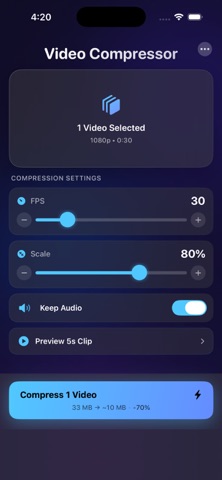
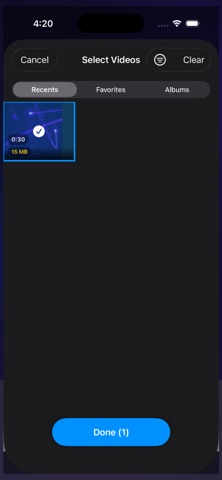
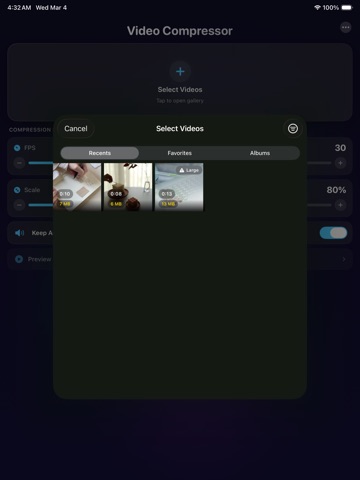
Compress videos in minutes — keep the quality, lose the file size. VidCompress shrinks your videos right on your iPhone, with no uploads, no accounts, and no cloud processing. WHY YOU'LL LOVE IT Running out of storage? Select dozens of videos and compress them all at once. Most compression apps make you do them one at a time — not this one. Pick your videos, tap compress, and get your space back. Need to send a video over WhatsApp, iMessage, or email? Shrink it down so it actually sends. No more "file too large" errors. WHAT MAKES IT DIFFERENT - Batch compression — select multiple videos and compress them in one go - Preview before you save — compare original vs. compressed so you know exactly what you're getting - Full control when you want it — adjust resolution, quality, frame rate, and audio settings - Works with 4K, 1080p, 720p, and everything in between - 100% private and offline — your videos never leave your device - No watermarks, no accounts, no subscriptions required to compress HOW IT WORKS 1. Select one or more videos from your library 2. Fine-tune your compression settings or just go with the defaults 3. Preview the savings — see exact file size before and after 4. Save and free up space instantly PERFECT FOR - Clearing the "Storage Almost Full" warning fast - Sending videos by text, email, or WhatsApp without huge file sizes - Faster uploads to Instagram, TikTok, YouTube, and Facebook - Reducing video size before backing up to iCloud, Google Drive, or Dropbox - Keeping more memories on your phone without buying more storage YOUR VIDEOS STAY WITH YOU Unlike most compression apps that upload your videos to a server, VidCompress processes everything locally on your device. No internet required. No data leaves your phone. Ever. Download VidCompress — the fastest way to shrink your videos without shrinking the quality.
Latest release
What’s New
VidCompress is a fast, private video compressor for iPhone. Reduce video file size, compress multiple videos at once, and free up storage — with no uploads, accounts, watermarks, or cloud processing. Compress 4K, 1080p, and 720p videos directly on your device while maintaining excellent visual quality. WHY YOU’LL LOVE VIDCOMPRESS Running out of iPhone storage? Select multiple videos and compress them together with batch video compression. Choose your videos, adjust the settings or use the recommended defaults, and quickly reclaim space. Need to send a large video through WhatsApp, iMessage, or email? Reduce the video’s file size so it is easier to share and upload. POWERFUL VIDEO COMPRESSION FEATURES • Batch video compression — select and compress multiple videos at once • File-size preview — see the estimated original and compressed sizes before saving • Before-and-after preview — compare video quality before you export • Custom compression settings — adjust resolution, video quality, frame rate, and audio • Support for 4K, 1080p, 720p, and other video resolutions • Private, offline processing — videos never leave your iPhone • No watermarks or account required • No subscription required for video compression HOW IT WORKS 1. Select one or more videos from your photo library 2. Use the recommended settings or customize the compression 3. Preview the quality and estimated file-size savings 4. Save the compressed videos and free up storage PERFECT FOR • Reducing large video file sizes • Clearing iPhone storage • Compressing multiple videos in one batch • Sending videos through WhatsApp, iMessage, or email • Preparing videos for Instagram, TikTok, YouTube, and Facebook • Speeding up video uploads and cloud backups • Reducing storage used in iCloud, Google Drive, or Dropbox • Keeping more photos and videos on your phone PRIVATE VIDEO COMPRESSION VidCompress processes videos locally on your iPhone. Your videos are not uploaded to a server, no internet connection is required, and your content stays on your device. Download VidCompress and reduce video file sizes without sacrificing the moments that matter.
Audience growth
Ratings growth
Baseline captured. Growth appears after the crawler observes a changed rating count.
Momentum comes from crawler snapshots for the tracked storefront. “Viral growth signal” means unusually fast recent rating gains; it is an indicator, not download data.
Price tracking
Price intelligence
First snapshot captured. The trend line starts after the next crawler price observation.
- First observed Sep 4, 2026 · 7:44 AM Free
Screenshots