About this app
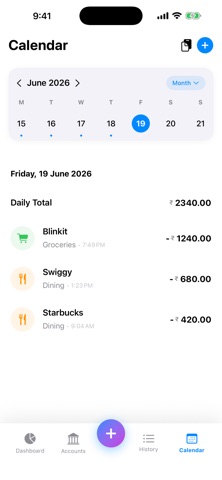
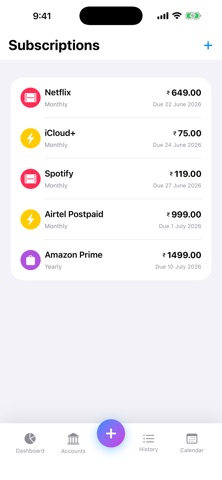
AI Expense Manager is a beautifully simple way to track your spending that respects your privacy. Your money data stays on your device — the AI runs on your iPhone, not in the cloud. SMART CAPTURE • Scan paper receipts — we extract the merchant, amount, and date • Paste a bank SMS and we log the transaction automatically • Quick entry: type "spent 30 on lunch yesterday" and we structure it for you AI THAT LEARNS YOU • Automatic categorization that gets smarter with every transaction • Spending insights and end-of-month forecasts, generated on-device • Unusual-activity alerts so nothing slips past you • Powered by Apple's on-device intelligence — no data leaves your phone STAY ON BUDGET • Monthly and per-category budgets • Alerts at 70%, 90%, and 100% so you never overspend • Recurring subscriptions detected automatically from your history ORGANIZED & FLEXIBLE • Multiple accounts: bank, cash, credit cards • Multi-currency with daily exchange rates — see everything in your home currency • Calendar view, powerful search, and Spotlight integration • Export to CSV anytime PRIVATE BY DESIGN • All data stored locally and encrypted on your device • Optional iCloud or Google sync — only if YOU turn it on • No ads. No tracking. No selling your data. Download AI Expense Manager and take control of your spending — the private way.
Latest release
What’s New
This update fixes an issue that caused the app to close immediately after opening. If version 2.0 wouldn't start for you, this release resolves it — and your data is safe and unchanged. Also in this update: • Fixed a crash that could occur while cloud sync was running • Fixed a rare crash on the Dashboard when viewing spending insights • Faster, smoother app launch, especially with a large transaction history Thank you for your patience — and for reporting it.
Audience growth
Ratings growth
Baseline captured. Growth appears after the crawler observes a changed rating count.
Momentum comes from crawler snapshots for the tracked storefront. “Viral growth signal” means unusually fast recent rating gains; it is an indicator, not download data.
Price tracking
Price intelligence
First snapshot captured. The trend line starts after the next crawler price observation.
- First observed Sep 4, 2026 · 2:38 AM Free
Screenshots