About this app
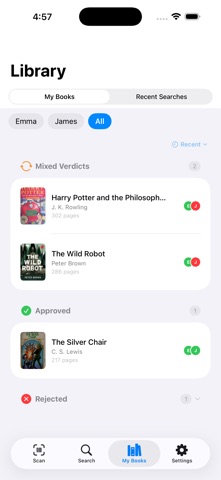
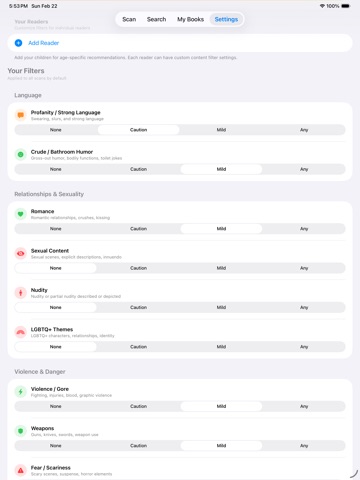
Scan any book’s barcode or search by title and get an AI-powered content analysis tailored to each reader in your family. Know what’s in a book before you read it, keep track of books you’re reviewing, and discover better-fit options for every reader. SCAN. SEARCH. ANALYZE. Point your phone at a barcode or search by title. Shelf Checkout analyzes the book’s content across 25 categories and gives you a clear verdict based on the preferences you set. REVIEW BOOKS WHEN THEY’RE READY Shelf Checkout’s Review Queue keeps track of books you’ve scanned or searched while analysis is still in progress. See what’s analyzing, what’s ready to review, and what needs another look. DISCOVER BETTER-FIT BOOKS Explore a Discover screen built around search and personalized recommendations by reader. Premium families can find fresh options based on reader profiles, family preferences, and books they have already reviewed. PERSONALIZED TO EVERY READER Set up reader profiles with custom content preferences. Whether you’re choosing books for yourself, your kids, your students, or your book club, each reader gets their own green, yellow, or red verdict. CLEARER CONTENT VERDICTS Verdict cards show content concerns by reader and severity, making it easier to see what matters, who it affects, and what else appears in the book. 25 CONTENT CATEGORIES From violence and language to romance, substance use, and more, Shelf Checkout covers the content areas that matter to you. You choose which categories to track and how sensitive each one should be. MAKE SHELF DECISIONS Decide what to do with each book for each reader. Add it to your bookshelf, save it for later, mark it reviewed, or reject it. Add private notes to remember why you made your decision. BATCH SCANNING At the bookstore or library? Scan multiple books in minutes. Review them all at once or let Shelf Checkout keep them organized in your Review Queue. COMMUNITY POWERED Think the AI-powered analysis missed something? Submit a correction. Verified community feedback improves the analysis for everyone. HOW IT WORKS Set up reader profiles with your content preferences Scan a barcode or search by title Review AI-powered content analysis with per-reader verdicts Track in-progress books in your Review Queue Discover personalized recommendations with Premium Make shelf decisions for each reader
Latest release
What’s New
Setup and onboarding improvements, a new privacy control, and reliability fixes.
Audience growth
Ratings growth
Baseline captured. Growth appears after the crawler observes a changed rating count.
Momentum comes from crawler snapshots for the tracked storefront. “Viral growth signal” means unusually fast recent rating gains; it is an indicator, not download data.
Price tracking
Price intelligence
First snapshot captured. The trend line starts after the next crawler price observation.
- First observed Aug 22, 2026 · 4:20 AM Free
Screenshots