About this app
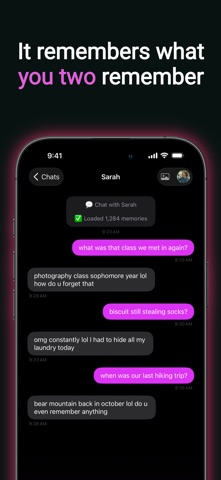
Some conversations deserve to continue. Re:vive lets you chat with an AI that mirrors the texting style of someone you know — built from your actual chat history. Import a conversation, and our AI learns how they write: their words, their tone, their personality. ■ HOW IT WORKS 1. Bring in a conversation — export from WhatsApp, KakaoTalk, or LINE, or screen-record an iMessage/SMS thread (read on your device, never uploaded) 2. Tap Re:vive in the share sheet — it imports automatically 3. Choose who you want to talk to 4. Start chatting — AI responds in their style ■ FEATURES • Advanced AI — Our most natural, in-character conversations yet. Works on every iPhone. • Style Learning — AI analyzes real messages to capture unique texting patterns, sentence length, emoji habits, and expressions • Chat Room Themes — imported rooms open looking like where they came from; switch themes anytime • Memory Recall — Ask about past conversations and AI remembers what was said • Photo Sharing — Send a photo into the chat. They'll see it, react to it, and bring it up later. (Advanced AI only.) • Create from Scratch — Build a persona without importing a chat. Describe them in your own words and add the moments you shared. • Custom Backgrounds — Set a personal photo as your chat background • iCloud Backup — Your conversations sync and restore across devices ■ YOUR DATA, YOUR CHOICE Your imported chats, memories, and settings are stored only on your device — never uploaded to our servers. You choose how replies are generated: • Advanced AI (recommended) — For the most natural conversations, on any iPhone. With your explicit consent, your message and small relevant excerpts of your chat are sent to our secure server to generate each reply. They are used only to create that reply, never to train AI models, and are never stored. • On-Device AI — Everything runs locally, nothing leaves your iPhone. Requires iPhone 15 Pro or later with Apple Intelligence enabled. This model reads text only, so photo sharing is unavailable while it is selected. Switch between them anytime in Settings. ■ IMPORTANT • Re:vive generates AI-simulated responses inspired by chat history — it does not connect you with real people • Supports English, Korean, and Japanese conversations — and the AI preserves how they actually talked (formal stays formal, casual stays casual) • Please only import conversations you own or have permission to use ■ FREE & PREMIUM Get started free with 3 conversations, 10 messages a day, and 1 photo a day. Watch a short video to add 10 more messages for that day (up to twice a day). Premium gives you unlimited conversations, unlimited messages, up to 10 photos a day, and no ads. Choose a weekly or yearly subscription, or a one-time lifetime purchase. We'd love to hear from you. Rate and review to help us improve Re:vive. Terms of Use (Apple Standard EULA): https://www.apple.com/legal/internet-services/itunes/dev/stdeula/
Latest release
What’s New
Bring over the conversations that matter — from wherever they live. • KakaoTalk & LINE import — bring in chats exported from KakaoTalk or LINE, alongside WhatsApp • iMessage & SMS import — Apple doesn't allow exporting Messages, so we built another way: screen-record the conversation and Re:vive reads it right on your device. The video is never uploaded. • Korean & Japanese — the app now speaks both, and the AI preserves the way they actually talked: 존댓말 stays 존댓말, 반말 stays 반말, 丁寧語 stays 丁寧語 • Chat room themes — imported rooms open looking like where they came from, and you can switch themes anytime in room settings • Share straight to Re:vive — send an exported file or recording from any share sheet • Clearer import progress, plus fixes for replies that arrived cut off
Audience growth
Ratings growth
Baseline captured. Growth appears after the crawler observes a changed rating count.
Momentum comes from crawler snapshots for the tracked storefront. “Viral growth signal” means unusually fast recent rating gains; it is an indicator, not download data.
Price tracking
Price intelligence
First snapshot captured. The trend line starts after the next crawler price observation.
- First observed Sep 4, 2026 · 7:30 AM Free
Screenshots