About this app
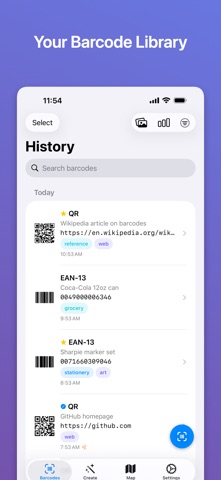
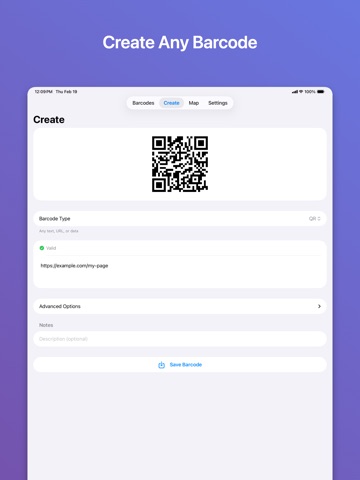
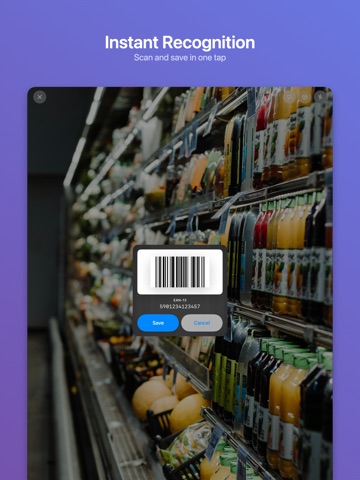
Barcode Stash is a fast, private barcode scanner and generator that keeps your entire barcode library organized in one place. SCAN ANYTHING Point your camera at any barcode and Barcode Stash reads it instantly. Supports 11 formats: QR, EAN-13, EAN-8, UPC-E, Code 128, Code 39, Code 93, PDF417, Aztec, DataMatrix, and ITF-14. Bulk mode lets you scan dozens of barcodes in rapid succession - each one is highlighted live in the viewfinder, and duplicates are automatically skipped. CREATE YOUR OWN Generate barcodes from scratch. Pick any supported format, enter your data, and get a pixel-perfect barcode ready to save or share. Real-time input validation catches errors before you tap save. STAY ORGANIZED Every barcode, scanned or created, is saved to a searchable history grouped by date. Add descriptions, tags, and favorites. Batch select to delete, tag, or export multiple barcodes at once. Filter by type, source, favorites, or tags to find what you need fast. SMART ACTIONS Barcode Stash detects what's inside each barcode and offers the right action: open a URL, compose an email, make a call, send an SMS, connect to Wi-Fi, add a calendar event, save a contact, or view a location on the map. MAP YOUR SCANS Barcodes captured with location data appear on an interactive map. Choose between standard, satellite, and hybrid views. Add or update locations on any barcode at any time. SHARE BEAUTIFULLY Share barcodes as a clean image or as a rich card with the barcode type, raw value, description, date, address, and a map snapshot. Choose exactly which details to include - your preferences are remembered. COLLECTION STATS View a breakdown of your barcode library: totals by type, favorites count, tags, locations, and how many you've generated versus scanned. SYNC ACROSS DEVICES iCloud keeps your barcodes in sync across all your devices. Changes sync automatically, no duplicates, no data loss. EXPORT & IMPORT Back up your entire collection as JSON or CSV, or import barcodes from another device. Duplicates are automatically detected and skipped on import. FULLY ACCESSIBLE Complete VoiceOver support throughout the app. Every button, toggle, and barcode row has descriptive labels and hints. Animations respect the Reduce Motion setting. AVAILABLE IN 10 LANGUAGES English, French, German, Spanish, Italian, Japanese, Korean, Portuguese (Brazil), Simplified Chinese, and Traditional Chinese. PRIVACY FIRST No accounts. No tracking. No servers. Your barcodes stay on your device and in your iCloud - nowhere else.
Latest release
What’s New
- Name your barcodes with a custom title, shown in the list, detail view, and generator - New tagging system: create, manage, and assign color-coded tags to organize your collection - Improved scanner camera with animated zoom controls, tap-to-focus, and lens haptics
Audience growth
Ratings growth
Baseline captured. Growth appears after the crawler observes a changed rating count.
Momentum comes from crawler snapshots for the tracked storefront. “Viral growth signal” means unusually fast recent rating gains; it is an indicator, not download data.
Price tracking
Price intelligence
First snapshot captured. The trend line starts after the next crawler price observation.
- First observed Sep 4, 2026 · 7:44 AM Free
Screenshots