About this app
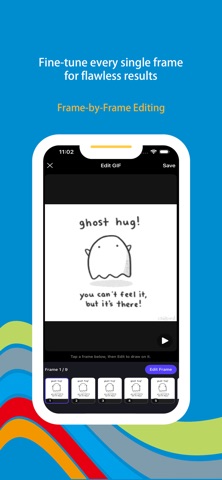
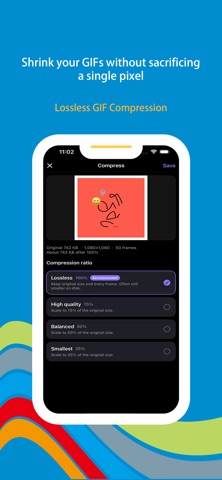
Wonder Gif is your all-in-one GIF playground — part creator, part editor, and totally obsessed with turning your ideas into moving masterpieces. Newbie or pro, you'll be cranking out killer GIFs before you know it. --- **Smart GIF Keyboard for Effortless Expression** The built-in smart GIF keyboard enables one-tap access across any chat or input scenario, and uniquely converts text into GIFs in real time — simply type and a dynamic GIF is automatically generated. Seamlessly integrated with a local resource library, it also allows users to favorite, categorize, and quickly search their own GIFs for instant reuse in social chats, emails, or documents, greatly boosting daily communication efficiency. **Multi-Mode Creation for All Source Types** To accommodate different creative starting points and material formats, the app offers diverse GIF generation methods: - AR Mode: Leverages augmented reality technology to capture dynamic scenes from the real environment in real time, adding a sense of spatial immersion to GIFs. - Video to GIF: Supports importing local video files, allowing users to select arbitrary clips and convert them quickly while preserving high-fidelity image quality. - Photo to GIF: Supports combining single or multiple static images into dynamic sequences, breathing life into still pictures. - Panorama to GIF: Converts wide-angle panoramic images into panning dynamic effects, ideal for landscapes, architecture, and similar scenes. With multiple modes running in parallel, users can always find the most suitable creative path regardless of their source material. **Comprehensive Editing Toolchain for Custom Visuals** The app offers a full suite of visual editing tools with intuitive controls, including freeform and preset crop options, a wide range of color filters (vintage, monochrome, film, warm/cool, and more), localized mosaic blur for privacy or creative effects, resizable and transparent emoji overlay, customizable text annotation with adjustable font, size, color, and stroke, as well as background color replacement. These tools can be used independently or layered together, accommodating everything from quick touch-ups to sophisticated visual storytelling — and that's just the beginning; many more editing features await your discovery. **Frame-by-Frame Refinement for Pixel-Level Control** The app offers a frame-by-frame editing view for precise animation adjustments. Users can browse individual frames and perform operations such as deletion, duplication, replacement, or partial modification on any single frame. This mode is ideal for fixing anomalies, adjusting timing, removing redundant content, or hand-drawing enhancements, giving animators and professionals maximum creative control. **Lossless Compression Engine Balancing Quality and Sharing** The app features an advanced intelligent compression algorithm that significantly reduces GIF file sizes while preserving clarity and color fidelity. Users can adjust compression intensity and preview before-and-after results to balance size and quality. Compressed GIFs load faster and share easily across Facebook, X, email, and messaging platforms, while also saving device storage. --- **Subscription Service** When you subscribe to the "VIP Subscription" service, you will enjoy the following benefits: 1. Unrestricted access to all features. 2. AI content recommendations based on usage habits. Payment for subscriptions is straightforward—the user's iTunes account is credited immediately after confirmation of purchase and payment. Please note that the Apple iTunes account will be automatically debited 24 hours prior to expiration. Upon successful deduction, the subscription term will be extended by one subscription cycle. User Agreement: https://www.wonderda.com/agreement.html Privacy Agreement: https://www.wonderda.com/privacy.html
Latest release
What’s New
Thanks for staying with us! In this version, you'll find: 1. New UI features 2. Fix bugs
Audience growth
Ratings growth
Baseline captured. Growth appears after the crawler observes a changed rating count.
Momentum comes from crawler snapshots for the tracked storefront. “Viral growth signal” means unusually fast recent rating gains; it is an indicator, not download data.
Price tracking
Price intelligence
- First observed Aug 10, 2026 · 7:56 AM Free
Screenshots