About this app
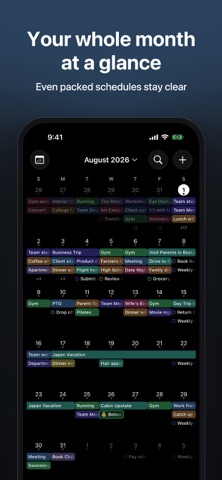
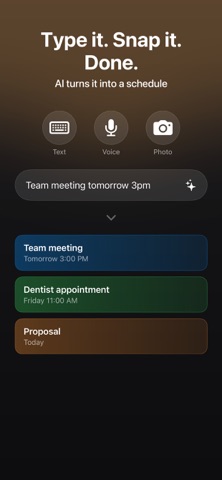
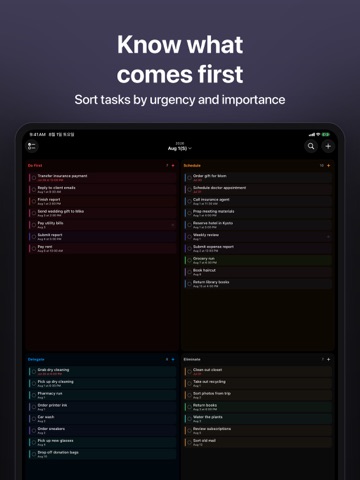
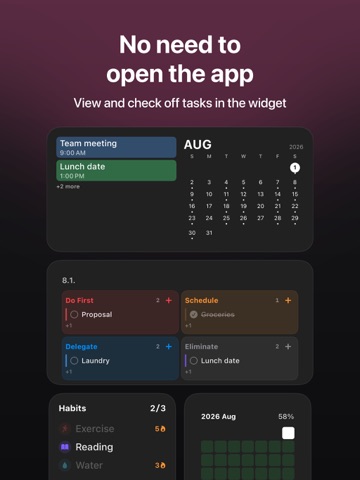
AnySchedule brings your schedule, to-dos, and habits together in one simple planner. See your whole day right on your Lock Screen wallpaper — and type a single line or snap a photo to let AI add events for you. No more jumping between apps. LOCK SCREEN SCHEDULE WALLPAPER Turn your Lock Screen into a personal schedule board. Display today's events, to-dos, and habits as your Lock Screen wallpaper. Set your favorite photo as the background and freely customize font size, color, and layout. With time-based profiles, switch wallpapers automatically — work schedule in the morning, workout routine in the evening. See your daily plan at a glance every time you pick up your iPhone. ADD EVENTS IN SECONDS WITH AI Just type "dentist tomorrow 3pm" and AI fills in the date, time, and repeat pattern for you. Snap or paste a photo of a poster, invitation, or booking screenshot, and it instantly becomes an event. It even reads timetables and shift schedules. Photograph your work roster and AI recognizes day, night, and off codes — picking out just your shifts and adding them all at once. Share from any app: send an image or text to AnySchedule from the share sheet and it's analyzed and added right away. With Siri and Shortcuts, add events straight from your Lock Screen without even opening the app. YOUR AI DAILY ASSISTANT Ask Siri for a spoken summary of today's events, to-dos, and habits. Feeling stuck? AI breaks big tasks down into small, actionable steps. Get suggestions for the best times to focus, exercise, or rest, based on your energy level from sleep and activity data. CALENDAR VIEWS FOR DAILY PLANNING View your schedule in Daily, Weekly, or Monthly calendar views. A rich timeline calendar shows every event at a glance, with smart overlap handling so nothing gets lost. Swipe between days or weeks effortlessly. TO-DO LIST THAT GETS DONE Create to-dos with deadlines, optional due times, and four priority levels. See what's urgent at a glance with color-coded priority indicators. Mark to-dos complete with a single tap and watch your progress grow. BUILD BETTER HABITS Track daily or weekly habits with flexible frequency settings. Choose between simple Yes/No check-ins or count-based goals (like "8 glasses of water"). Watch your streaks grow, visualize consistency with a GitHub-style heatmap, and review your weekly completion rate. WIDGETS & LIVE ACTIVITY Add beautiful home screen widgets to see today's schedule, upcoming to-dos, or active habits at a glance. Choose from multiple styles including clear and blur variants. Live Activity support keeps your planner visible on your Lock Screen and Dynamic Island. SYNC YOUR CALENDARS & REMINDERS Bring in your existing Apple Calendar, Google Calendar, and Reminders. Everything shows up together in one planner, with automatic duplicate detection so nothing appears twice. SMART NOTIFICATIONS Set reminders exactly when you need them — at the event time, 10 minutes, 30 minutes, 1 hour, or even a day before. Never miss a deadline or forget a habit check-in. CUSTOMIZE YOUR PLANNER Personalize each item with 12 vibrant color presets and hundreds of icons. Add notes for extra context. Need a simpler, more focused view? Turn on ADHD Mode. The sleek dark-mode interface with glass-effect cards makes planning feel effortless. WORKS EVERYWHERE iPhone, iPad, and Mac — with iCloud sync keeping everything up to date across your devices. Start planning your day with AnySchedule today.
Latest release
What’s New
- Tapping + now opens a quick menu right in place, so you can add items faster. - Menus across the app have a fresh new look. - Fixed a flicker when switching tabs, and each tab now keeps the screen you were viewing.
Audience growth
Ratings growth
Baseline captured. Growth appears after the crawler observes a changed rating count.
Momentum comes from crawler snapshots for the tracked storefront. “Viral growth signal” means unusually fast recent rating gains; it is an indicator, not download data.
Price tracking
Price intelligence
- First observed Aug 8, 2026 · 1:30 PM Free
Screenshots