About this app
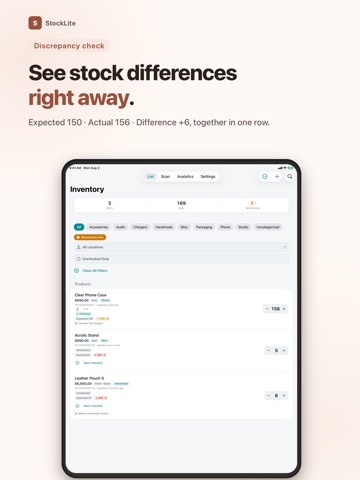
Count stock by barcode and see expected-versus-actual variance instantly. StockLite is a focused inventory counter for small retailers, resellers, and stockrooms. Scan items in or out, run a stocktake, and find mismatches without an account or server. Your inventory stays on your device. SCAN, COUNT, SPOT THE GAP • Choose receiving or removal before you scan. • See expected quantity, actual quantity, and variance together. • Undo the latest scanner change for four seconds. • Use the torch on supported devices; enable sound and haptics separately. FIND THE RIGHT ITEM FAST • Sort by recent scan, custom order, name, barcode, quantity, or reorder priority. • Filter by shelf location, variance, or unchecked items during a stocktake. • Add items without barcodes using a SKU. • Track condition, purchase cost, sell price, shelf location, and notes. STOCKTAKE & CSV • Import an expected-stock CSV before counting. • Check unchecked, checked, and mismatched items as you go. • Export your full inventory or stocktake results as CSV for spreadsheet review. • Try one CSV export on the free plan. SUPPLIERS & INSIGHTS • Assign a main supplier and search by supplier name. • Review product count, stock quantity, value, and variance by supplier. • See estimated gross profit and margin from sell price and cost. • Set reorder points and receive a local reminder up to once a day. NEARBY-DEVICE SHARING Send a StockLite file by AirDrop and merge it on another nearby device. This is file-based transfer, not live cloud sync. PRIVATE BY DESIGN No account. No ads. No data collected. No server required. STOCKLITE PREMIUM — ONE-TIME PURCHASE Remove the 30-item limit and unlock unlimited items, full CSV export, nearby-device file merge, analytics, and complete stock history. No subscription. CSV exports are spreadsheet-ready data copies, not restorable app backups.
Latest release
What’s New
Stocktaking and daily stock changes are faster and safer. SCAN IN / SCAN OUT • Choose receiving or removal before you scan • Undo the latest scanner stock change for four seconds • Toggle the torch on supported devices • Enable sound and haptics separately (both off by default) FIND ITEMS FASTER • Seven sort modes, including name, barcode, quantity, reorder priority, and custom order • Filter by shelf location, variance, or unchecked items during a stocktake SAFER EDITING & CSV • Changes stay in a draft until Save succeeds • Export all inventory as CSV from Settings • Improved temporary-file cleanup after sharing ALSO • Accessibility and all seven localizations improved • More reliable data refresh and error messages • Bug fixes CSV exports are spreadsheet-ready data copies, not restorable app backups. StockLite is now free for up to 30 items. Premium is a one-time purchase with no subscription. If you previously bought the paid app, the same Premium features remain unlocked.
Audience growth
Ratings growth
Baseline captured. Growth appears after the crawler observes a changed rating count.
Momentum comes from crawler snapshots for the tracked storefront. “Viral growth signal” means unusually fast recent rating gains; it is an indicator, not download data.
Price tracking
Price intelligence
First snapshot captured. The trend line starts after the next crawler price observation.
- First observed Aug 19, 2026 · 9:05 AM Free
Screenshots