About this app
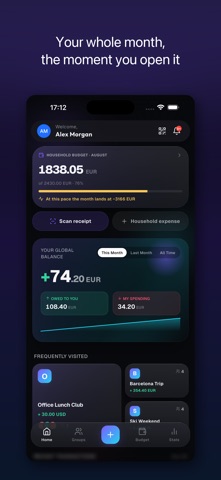
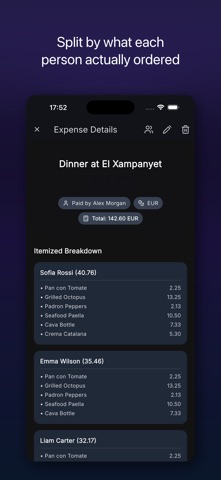
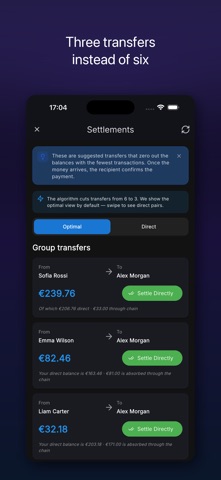
Splitko makes splitting bills and tracking group expenses effortless. Snap a photo of any receipt — AI reads every item in seconds — assign items to friends, and settle up with one tap. No spreadsheets, no awkward money talks. WHY SPLITKO - AI RECEIPT SCANNER — Point your camera at a receipt and Splitko itemizes it automatically. Works out of the box, nothing to configure. 10 free scans every month. - LIVE RECEIPT SPLITTING — Split a restaurant bill together in real time. Everyone taps their own items on their own phone. Done before the waiter returns. - GROUP EXPENSES — Trips, roommates, couples, events. Create a group, add expenses, and Splitko keeps a running balance of who owes whom. - SMART SETTLE UP — Splitko minimizes the number of transfers needed. Settle via Revolut with one tap, or mark payments manually. - QUICK SPLIT — Split a one-off bill without creating a group. Perfect for a spontaneous dinner. - WORKS OFFLINE — Add expenses anywhere, even without internet. Everything syncs when you're back online. - MULTI-CURRENCY — Traveling? Mix currencies in one group; Splitko converts automatically. - GROUP BUDGETS — Set a budget for a trip or a household and see in real time how you're doing. INVITE IN SECONDS Share a link or QR code. Friends join your group instantly — even if they install Splitko after tapping the link, they land right in the group. FREE TO START Core features are free forever, including 10 AI receipt scans per month. Premium unlocks unlimited scans and power features. Invite friends to earn free Premium days. PERFECT FOR Holidays with friends · roommates & shared flats · couples · stag/hen parties · ski trips · office lunches · festivals · family budgets Download Splitko and never chase your friends for money again. Questions? hello@splitko.app · Privacy: splitko.app/privacy-policy Terms of Use: https://splitko.app/terms Privacy Policy: https://splitko.app/privacy-policy Apple Standard EULA: https://www.apple.com/legal/internet-services/itunes/dev/stdeula/
Latest release
What’s New
Flick the month, tell us what's wrong • Drag the Budget card sideways to move between months. The arrows stay for anyone who prefers to tap. • A way to reach us: Profile, then Help, then Report a problem. It comes straight to us, with your app version attached. • Whoever runs the household can now remove an entry somebody else added, and deleting a receipt no longer strands the expense behind it. • Lists sort by when things actually happened, not by your phone's clock.
Audience growth
Ratings growth
Baseline captured. Growth appears after the crawler observes a changed rating count.
Momentum comes from crawler snapshots for the tracked storefront. “Viral growth signal” means unusually fast recent rating gains; it is an indicator, not download data.
Price tracking
Price intelligence
First snapshot captured. The trend line starts after the next crawler price observation.
- First observed Sep 1, 2026 · 2:56 PM Free
Screenshots