About this app
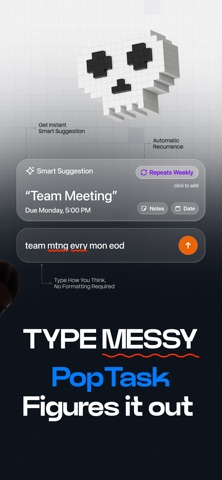
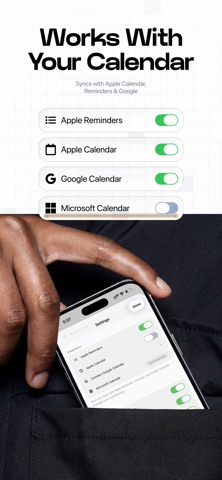
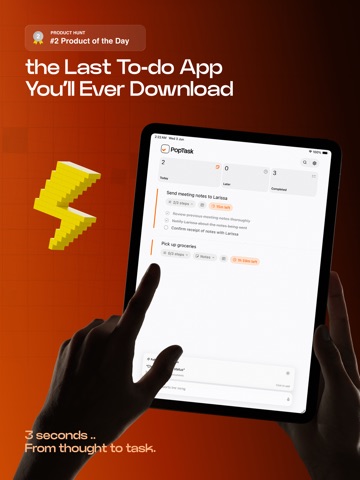
3 seconds from thought to task. No taps wasted, no app switching. PopTask is the AI powered to do list, task manager, and daily planner for your iPhone and iPad. Capture tasks, set reminders, plan your day, track habits, and stay on top of everything without the busywork. Add a task in seconds, then get on with your day. JUST TYPE. POPTASK FIGURES IT OUT. PopTask is not your average to do list app. It uses on device AI to read the way you naturally type. Write "email the deck to Sarah tomorrow at 9", "dentist next Friday at 2pm", or "gym mon wed fri 6am" and PopTask figures out the title, the due date, the time, and the recurring pattern on its own. Names stay intact. Messy shorthand still works. No date pickers. No dropdown menus. No forms. The smartest to do list planner and GTD task organizer on iPhone. SYNC ACROSS IPHONE, IPAD, AND MAC WITH iCloud Your tasks sync through your own iCloud, backed up and current on every device. Add a task on your iPhone and it is already on your iPad and Mac. PopTask also syncs with Apple Reminders, Apple Calendar, and Google Calendar, so your tasks live alongside the events and reminders you already keep. WIDGETS, LOCK SCREEN, AND DYNAMIC ISLAND Keep today one glance away. Add Home Screen and Lock Screen widgets, watch your next task count down in the Dynamic Island, and add a task fast from Control Center or the Share Sheet in any app. VOICE INPUT, FULLY ON DEVICE Add tasks completely hands free. Tap the microphone, speak naturally, and PopTask turns your speech into organized tasks in real time. Speech recognition runs on device, so your voice never leaves your iPhone. SIRI AND APPLE SHORTCUTS Say "Hey Siri, add a task to PopTask" and it is created instantly. Build automations with Apple Shortcuts to add tasks, mark them done, or search your list. Made for the way you already use your iPhone. AI TASK BREAKDOWN Overwhelmed by a big project? Tap the AI button and PopTask splits any task into clear, doable subtasks. Turn large goals into small wins. Perfect for projects, study sessions, and weekly planning. SMART NOTIFICATIONS AND A DAILY SUMMARY Never miss a deadline. PopTask sends notifications at the time you choose: at due time, or 5, 15, 30 minutes, or 1 hour ahead. Start every morning with a summary of the day's tasks, reminders, and events. RECURRING TASKS AND HABITS Type "gym every Tuesday and Thursday at 7:30am", "gym mon wed fri 6am", or "pay rent monthly" and PopTask sets the pattern for you. Daily, weekly, monthly, and custom intervals. The easiest way to build habits and routines on iPhone. SNOOZE IN PLAIN LANGUAGE Life happens. Type "Friday 3pm" or "in 2 hours" into the snooze field and PopTask reschedules. No rigid time pickers. 9 LANGUAGES Use PopTask in English, Arabic, Chinese (Simplified), Chinese (Traditional), Dutch, French, Japanese, Spanish, or Italian. Type tasks and dates in your language and the interface follows. BUILT FOR ADHD, GTD, AND BUSY MINDS ADHD, Getting Things Done, or just too much to remember: PopTask lowers the load. No boards. No tags. No complexity. Just tasks, deadlines, and reminders that work. PRIVACY FIRST Tasks are stored on your device and synced only through your own iCloud, which PopTask never sees. Voice is processed on device. No account. No tracking. No ads. FREE TO START Use PopTask free forever for up to 3 active tasks. PopTask Pro unlocks unlimited tasks, AI smart add, voice input, calendar and reminders sync, Siri, shortcuts, and recurring tasks. Monthly, annual, or a one time lifetime purchase. Payment is charged to your Apple ID. Subscriptions auto renew unless cancelled 24 hours before the period ends. Manage in Settings > Apple ID > Subscriptions. Stop managing your task manager. Start managing your tasks. Terms of Use: https://www.apple.com/legal/internet-services/itunes/dev/stdeula/ Privacy Policy: https://poptask.bar/privacy-policy
Latest release
What’s New
New in 2.4 PopTask now learns how you actually work. Correct a suggested time once and it remembers for that kind of task, so if your gym is an evening thing, "gym at 6" starts meaning 6 PM for you. It keeps your weekday and weekend habits apart, too. - It learns your words as well. Your shorthand and your usual typos stop needing fixing, and a name it does not recognize is left exactly as you typed it. - Everything it learns travels to your iPhone, iPad and Mac through your own iCloud, and never leaves it. - Meal, evening and prayer words now work in every language PopTask speaks, not just English. Fajr, dhuhr, asr, maghrib and isha each get their own time instead of one blanket guess. - It learns from wherever you add a task, including the share sheet and Siri. - Suggestions appear noticeably faster while you type. - Recurring tasks are safer. Completing one, or undoing that, can no longer affect a different task that happens to share its name. Made by one person who reads every review and is excited to build more. Tell me what you'd like to see next.
Audience growth
Ratings growth
Baseline captured. Growth appears after the crawler observes a changed rating count.
Momentum comes from crawler snapshots for the tracked storefront. “Viral growth signal” means unusually fast recent rating gains; it is an indicator, not download data.
Price tracking
Price intelligence
First snapshot captured. The trend line starts after the next crawler price observation.
- First observed Aug 8, 2026 · 11:06 PM Free
Screenshots