About this app
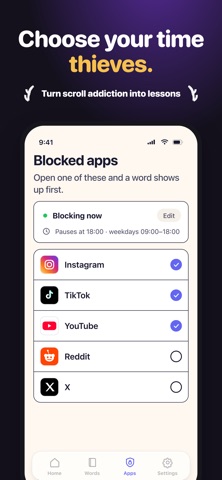
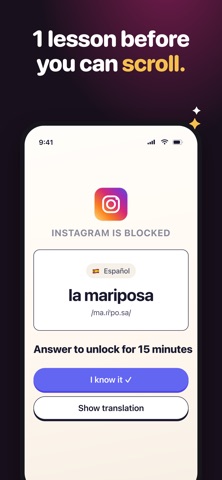
Every time you reach for Instagram, TikTok, or YouTube, LearnScreen shows you a vocabulary flashcard instead. Turn screen time into learn time — 1,000+ new words a year, passively. You don't fight the phone. You don't add another daily study session. You learn in the exact moments you'd otherwise be scrolling. WHY LEARNSCREEN The average person unlocks their phone 96 times a day. That's 96 wasted micro-moments — or 96 chances to actually learn something. Most language apps fail because they require willpower and a daily streak. Most screen-time blockers fail because they require willpower too. LearnScreen needs neither. It hijacks the impulse you already have and turns it into vocabulary. KEY FEATURES • Smart app blocker — Block distracting apps like TikTok, Instagram, YouTube, X, Reddit, Snapchat with one tap • Vocabulary flashcards on every unlock — Learn words in 11 languages: English, Spanish, German, French, Italian, Portuguese, Russian, Polish, Japanese, Korean, Chinese • Spaced repetition (SM-2, Anki-style, Leitner system) — Words come back at the optimal interval so they actually stick • 1,080+ curated words built in — Or add your own custom word lists • Streak tracking — Build a daily learning habit without daily lessons • Focus mode and Dumb Phone mode — Get the discipline of a feature phone without buying one • Digital detox built in — Less mindless scrolling, more real knowledge • 100% offline and private — No account needed, no data leaves your device • Designed for iPhone — Native, fast, minimalist, no ads HOW IT WORKS 1. Pick which apps to block — TikTok, Instagram, or whatever steals your time 2. Try to open a blocked app 3. A flashcard appears: a foreign word with translation and pronunciation 4. Answer correctly and the app unlocks for a short window 5. Words you learn repeat at scientifically optimal intervals (spaced repetition) 6. Over weeks, your vocabulary compounds while your screen time falls PERFECT FOR • Language learners building vocabulary for English, Spanish, German, French, Italian, Portuguese, Russian, Polish, Japanese, Korean or Chinese • Students preparing for exams (TOEFL, IELTS, SAT, GRE) • Adults rebuilding a daily learning habit • Anyone trying to reduce phone addiction or mindless scrolling • People curious about dumb phones who still need a smartphone • Digital minimalists, ADHD-friendly focus seekers, parents managing their own screen time WHAT MAKES IT DIFFERENT Duolingo asks you to open another app. LearnScreen meets you where you already are — the lock screen. No daily streak guilt. No tutorial maze. Anki is the gold standard for memory but has a steep curve. LearnScreen ships the same SM-2 spaced-repetition algorithm with zero setup — preloaded words, instant card flow, automatic intervals. Pure screen-time blockers (Opal, one sec, ScreenZen) make scrolling harder. LearnScreen makes the alternative more rewarding: every blocked unlock returns something you keep. THE SCIENCE Spaced repetition has been studied for 40+ years — from Ebbinghaus's forgetting curve to modern SM-2 and FSRS implementations. The algorithm shows you each word right before you'd forget it, so 5 reviews lock a word in long-term memory. LearnScreen runs SM-2 by default. Terms of Use: https://learnscreen.vercel.app/terms.html Privacy Policy: https://learnscreen.vercel.app/privacy.html Start turning screen time into learn time. Download LearnScreen.
Latest release
What’s New
A clearer start Set up your words, blocked apps and schedule with an interactive onboarding that explains how learning earns app time. Learning, at a glance A simpler Home screen and clearer shield explain your coins, quick reviews and unlock time. Know what is happening Word imports and auto-fill now show clearer loading, results and errors. We also improved navigation and review summaries.
Audience growth
Ratings growth
Baseline captured. Growth appears after the crawler observes a changed rating count.
Momentum comes from crawler snapshots for the tracked storefront. “Viral growth signal” means unusually fast recent rating gains; it is an indicator, not download data.
Price tracking
Price intelligence
First snapshot captured. The trend line starts after the next crawler price observation.
- First observed Sep 22, 2026 · 1:51 PM Free
Screenshots