About this app
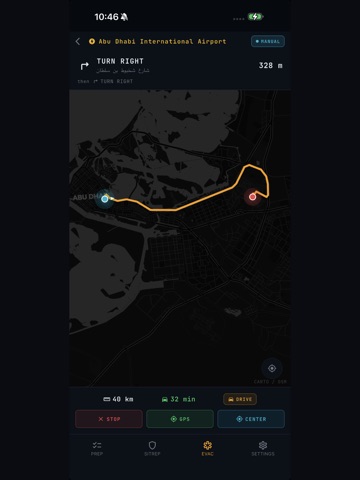
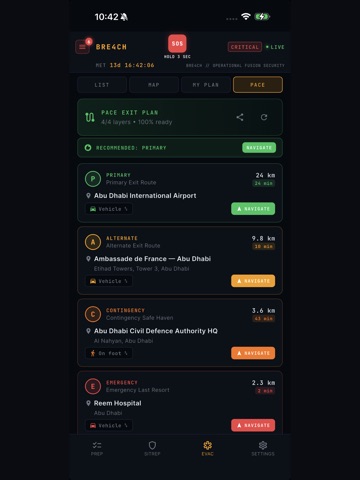
3 TABS. EVERYTHING YOU NEED. PREP Prepare before the situation escalates. Download offline maps for use without network connectivity Store critical documents in a secure encrypted vault Access essential checklists for personal readiness Prepare embassy contact packs and emergency resources Define your personal preparedness plan Preparation is the difference between panic and control. SITREP Clear and structured Situation Reports. 40+ verified open sources Official alerts, cross-referenced and contextualized Regional security updates from institutional sources Continuous feed delivered through live updates No noise. Only the information that matters. EVAC When movement becomes necessary, speed matters. Locate embassies, shelters, hospitals and airports Access evacuation routes on offline-capable maps Identify safe locations nearby with real-time weather overlay Navigate instantly with distance and direction indicators Because in a crisis, every minute counts. Built for Challenging Environments BRE4CH was designed to function when infrastructure is unreliable: Offline capabilities Minimal data consumption Clear and structured information Verified institutional sources only The application focuses on clarity, verification and operational usefulness. Privacy by Design No account required No user tracking No personal data stored GDPR compliant Your information stays on your device. Who is it for? BRE4CH is designed for: Expatriates living in regions with elevated risk Families seeking reliable crisis preparedness tools Travelers in unfamiliar or unstable environments Security-conscious professionals and organizations Stay informed. Stay prepared. Stay safe.
Latest release
What’s New
**BRE4CH v2.1.0 — Major Stability & Preparedness Update** **CRITICAL FIX** - Fixed persistent UI glitch causing header flickering and layout instability across all screens **NEW FEATURES** - Weather Radar: live weather overlay on evacuation map (toggle on/off) - AI-Generated Situation Reports: automated briefings from 40+ verified sources, updated twice daily - Theater Overview: regional defense systems map with real-time statistics - Enhanced intelligence pipeline: 29 institutional data sources aggregated every 15 minutes - Interactive guided tour: spotlight tutorial highlights key features on first launch (replay from Settings) - Power Mode: switch between ECO (battery saving) and BOOST (real-time) with live energy benchmark - Embassy Pack Export: download consular data as PDF, XML or CSV for offline use - PACE Exit Plan: 4-layer evacuation routing with one-tap navigation - Dynamic Disclaimer: comprehensive legal disclaimer now managed remotely, covering evacuation plan methodology, passport data handling, vault encryption, and GDPR-compliant data erasure **IMPROVEMENTS** - Threat level popup now dismisses correctly (previously caused black screen) - Briefing timestamps now clearly labeled "Generated by AI" - Alert system: improved deduplication and stale alert cleanup - Backend stability: error handling hardening, environment validation, polling backoff - Defense statistics updated in real-time from verified institutional sources - SOS Agent: "Send SITREP now" auto-opens SMS pre-filled with emergency contacts - Share BRE4CH: share link now works correctly from Profile Setup and Settings - Offline Navigation: compass + GPS with dead-reckoning fallback - Embassy filter correctly updates when changing nationality - 38 languages supported **FIXES** - Fixed critical crash when closing threat assessment popup - Fixed alert display showing outdated notifications - Fixed manual position override expiring incorrectly - Fixed SOS button not displaying on all screens - Improved overall layout stability and performance
Audience growth
Ratings growth
Baseline captured. Growth appears after the crawler observes a changed rating count.
Momentum comes from crawler snapshots for the tracked storefront. “Viral growth signal” means unusually fast recent rating gains; it is an indicator, not download data.
Price tracking
Price intelligence
First snapshot captured. The trend line starts after the next crawler price observation.
- First observed Sep 4, 2026 · 12:41 AM Free
Screenshots