About this app
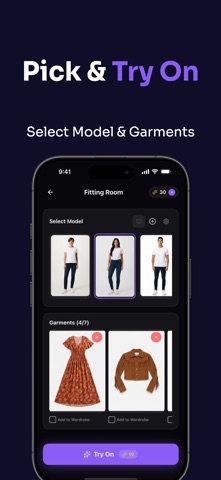
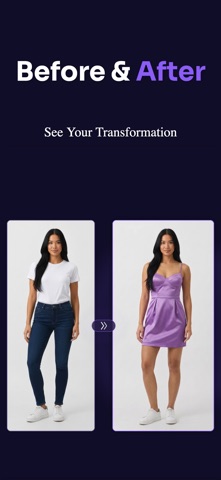
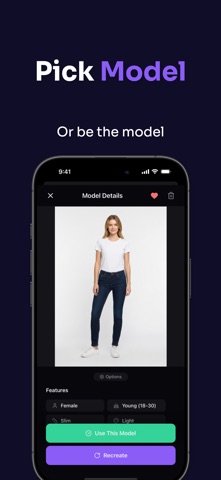
Try any outfit on yourself — instantly, with AI. Dressapp lets you see how clothes look on you before you buy them. Just upload your photo and any garment image, and our AI generates a realistic photo of you wearing it. HOW IT WORKS 1. Upload or take a photo of yourself 2. Add a garment photo from your gallery, camera, or the web 3. Tap Generate — AI creates a realistic try-on image in seconds KEY FEATURES ◆ AI Virtual Try-On Upload your photo and any garment — tops, bottoms, dresses, outerwear, shoes, bags, and accessories. See exactly how it looks on you. ◆ AI Photo Studio Create professional model photos and custom backgrounds using AI. Perfect for social media content and outfit inspiration. ◆ Multi-Item Outfits Combine up to 7 pieces in a single outfit. Mix tops, bottoms, shoes and accessories to build complete looks. ◆ Smart Wardrobe Save all your garments in one place. AI automatically categorizes them — tops, bottoms, outerwear, shoes, bags, and more. ◆ Outfit History Every generated look is saved. Swipe through your history, save favorites to your photo library, or share them. ◆ Credits System Start with 20 free credits. Purchase credit packs or subscribe for monthly credits at a better value. SUBSCRIPTION PLANS • Weekly: $6.99/week — 100 credits • Monthly: $14.99/month — 300 credits (Most Popular) • Yearly: $79.99/year — 3000 credits (Best Value, save 55%) CREDIT PACKS • 25 Credits — $2.99 • 75 Credits — $6.99 • 200 + 10 Bonus — $14.99 • 500 + 50 Bonus — $29.99 Payment will be charged to your Apple ID account at confirmation of purchase. Subscriptions automatically renew unless canceled at least 24 hours before the end of the current period. Your account will be charged for renewal within 24 hours prior to the end of the current period. You can manage and cancel your subscriptions by going to your account settings in the App Store after purchase. Terms of Service: https://dressapp-three.vercel.app/terms Privacy Policy: https://dressapp-three.vercel.app/privacy
Latest release
What’s New
Performance improvements and bug fixes.
Audience growth
Ratings growth
Baseline captured. Growth appears after the crawler observes a changed rating count.
Momentum comes from crawler snapshots for the tracked storefront. “Viral growth signal” means unusually fast recent rating gains; it is an indicator, not download data.
Price tracking
Price intelligence
First snapshot captured. The trend line starts after the next crawler price observation.
- First observed Sep 14, 2026 · 6:25 PM Free
Screenshots