About this app
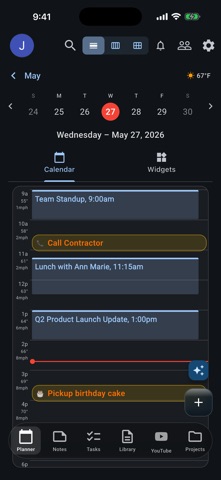
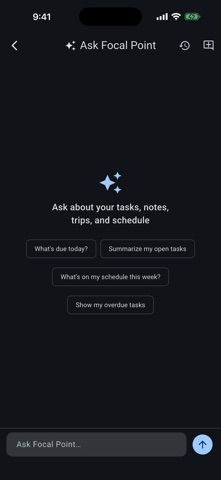
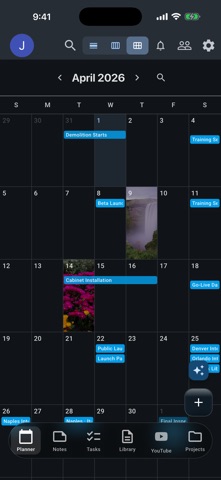
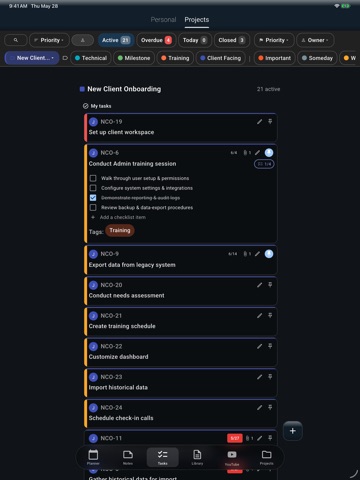
Focal Point is a uniquely designed productivity app that combines a simple yet stylized daily planner with powerful project management capabilities. PLAN YOUR DAY Stay on top of your daily routine with a streamlined view that brings together your tasks, reminders, events — everything you need to plan your day in one place. Pin and organize key tasks as well as notes, trip ideas, and documents you reach for most so they're always a tap away in your main view. SIMPLE TO START, POWERFUL WHEN NEEDED Focal Point scales with your needs. Create multiple one-line tasks in seconds, then add detail later if needed. More complex tasks can be broken down using built-in checklists and tailored to specific use cases with custom fields and tags. Templates allow you to create once and then reuse as many times as needed. GET ORGANIZED WITH PROJECTS When simple to-dos aren't enough, Projects let you bring everything together. Each project becomes a central hub for related tasks, notes, documents, bookmarks, calendar events, and YouTube links. Renovating your home? Managing a work initiative? Everything you need lives in one place. Organize documents into folders, track revisions, and keep files at your fingertips. Customize each project with colors and background images to make them uniquely yours. PLAN YOUR TRIPS Turn travel into a breeze with dedicated Trip projects. Import an existing itinerary to jumpstart your planning or build one from scratch using the app — map stops with interactive travel maps and place search, and keep flights, hotels, and car-rental reservations in one place. Planning a road trip? See the predicted weather at each stop throughout the day and time your route around the conditions. Traveling with others? Track shared expenses with automatic splitting, scan receipts with AI to log costs instantly, and collaborate with other Focal Point friends (Premium account required) so everyone stays in sync. BUILT FOR SHARING & COLLABORATION Focal Point's sharing capabilities make it perfect for small teams and families alike. Collaborate visually with sticky notes to brainstorm ideas, track progress, and communicate in real time with notes. Assign tasks to family members or teammates with clear ownership. Share projects to coordinate schedules, household responsibilities, or work initiatives. Everyone stays in sync with real-time updates. SHARE FROM ANYWHERE Found an interesting article or recipe? Use the Share Extension to save links from Safari or other apps directly to your Bookmarks or Notes — no copy-paste required. AI-POWERED PRODUCTIVITY Focal Point puts AI to work for you. Ask Focal Point — your built-in AI assistant — helps you find anything fast and answers questions across your tasks, notes, and documents. Just ask naturally, like "notes from last week's meeting" or "what's left on the renovation budget." AI also summarizes documents, suggests tasks, and scans trip receipts to capture expenses automatically. SPECIAL TOUCHES Add a personal touch to your daily routine. Celebrate life's moments with dynamic daily backgrounds that automatically appear for birthdays, anniversaries, and special occasions. PRODUCTIVITY ON ANY DEVICE With seamless support across iPhone, iPad, and Mac, your productivity travels with you. Start planning on your phone, review documents on your iPad, and manage tasks in kanban view on your Mac. Everything stays perfectly synchronized. PREMIUM FEATURES Upgrade to Premium for expanded file storage and desktop sync, project and trip sharing, Trip planning, smart weather forecasts for your events and travels, advanced AI capabilities, and more. Visit focalpointproductivity.app for complete plan details. Whether you're managing daily routines or ambitious long-term projects, Focal Point brings clarity and focus to everything you do. Terms of Use: https://focalpointproductivity.app/terms.html Privacy Policy: https://focalpointproductivity.app/privacy.html
Latest release
What’s New
Reminders now work across all your devices — set one on your Mac and it arrives on your iPhone, and vice versa. Task due dates, event alerts and recurring reminders all included, and they now appear in your in-app Notifications list too. New in Settings → Notifications: choose exactly which kinds of notifications can interrupt you, with a Pause All switch for quiet time. Reminder titles and template names can now be 40 characters.
Audience growth
Ratings growth
Baseline captured. Growth appears after the crawler observes a changed rating count.
Momentum comes from crawler snapshots for the tracked storefront. “Viral growth signal” means unusually fast recent rating gains; it is an indicator, not download data.
Price tracking
Price intelligence
First snapshot captured. The trend line starts after the next crawler price observation.
- First observed Aug 19, 2026 · 3:16 PM Free
Screenshots