About this app
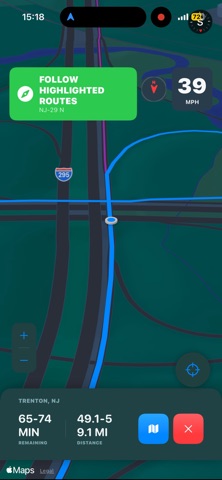
NAV – Navigation Assistant is an advanced navigation companion designed to provide greater route awareness and driver control. Rather than relying on a single suggested route, NAV scans and displays multiple route options simultaneously, helping you compare travel times, distances, and alternate paths before and during your trip. Core Features • Strategic Route Scanning: Analyze a primary route alongside multiple alternate routes with live travel time and distance comparisons. • Mission Recon Summary: Review estimated travel distance, duration ranges, and arrival windows before starting navigation. • Dynamic Route Switching: Automatically transitions to a more suitable scanned route if you naturally follow an alternate path. • Adaptive Camera Intelligence: Speed-based camera automatically zooms in for city driving and out for highways. • Manual Zoom Controls: Override the automatic camera with dedicated Zoom In, Zoom Out, and Auto Reset controls. • Live Destination Intelligence: View satellite imagery, business information, phone numbers, websites, and destination weather before departure. • Current & ETA Weather: Displays current weather at your location and forecasted conditions expected at your estimated arrival time. • Toll Awareness: Identifies known toll facilities along scanned primary and alternate routes before navigation begins to improve route awareness. • Voice Guidance: Spoken navigation announcements, route summaries, and arrival notifications with intelligent audio ducking. • Driver HUD: Live speed, compass heading, GPS accuracy, altitude, and route information presented in a clean, high-visibility interface. • Tactical Map Mode: Monitor live traffic, speed, heading, and current street information without starting navigation. • Manual Mission Mode: Track free-drive sessions without a destination while recording distance, speed, travel time, and a live breadcrumb trail. Choose between Portrait or Dashboard layouts. • Dashboard Mode: Transform your iPhone into a landscape driving dashboard featuring navigation telemetry, traffic, weather, GPS precision, media controls, battery status, connectivity indicators, and mission tracking. • Integrated Address Management: Save up to 48 destinations in your Address Book and maintain a Favorites list for one-tap navigation. • Continuous Path Visualization: A live breadcrumb system creates a seamless visual trail behind your vehicle, providing a continuous record of your journey while maintaining a unified navigation experience. • Mission Summary: Upon arrival, review a complete post-trip report featuring total distance, travel time, average speed, top speed, and an interactive Mission Map with color-coded speed visualization and route recap. NAV combines Apple Maps, live traffic, weather intelligence, destination previews, toll awareness, and intelligent route monitoring into a single navigation experience designed to give drivers more information before and during every trip. Always obey traffic laws, remain attentive while driving, and use NAV as a supplemental navigation aid.
Latest release
What’s New
• Improved map interaction and camera behavior • Freely pan and explore the map when not actively navigating • Improved recentering behavior • Reduced unwanted map movement while exploring routes
Audience growth
Ratings growth
Baseline captured. Growth appears after the crawler observes a changed rating count.
Momentum comes from crawler snapshots for the tracked storefront. “Viral growth signal” means unusually fast recent rating gains; it is an indicator, not download data.
Price tracking
Price intelligence
First snapshot captured. The trend line starts after the next crawler price observation.
- First observed Aug 19, 2026 · 4:21 PM Free
Screenshots