About this app
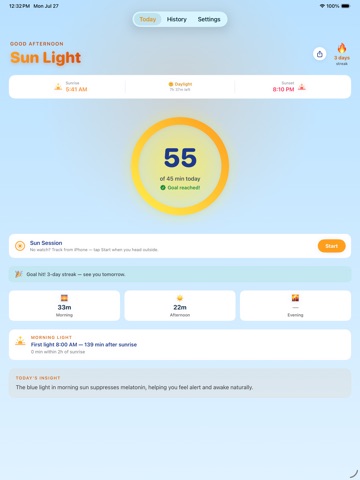
Get outside. Sun Light does the rest. Sun Light turns your daily sunlight into a simple ring, a streak, and a clear picture of when you actually got your light — morning, afternoon, or evening. Most people get less daylight than they think. Sun Light makes it visible in one glance, from your home screen or your wrist. WHAT YOU GET • Daily daylight ring and streak • Morning light window — see your first daylight of the day against sunrise • Morning, afternoon and evening breakdown • 7-day history chart • Shareable daily card • Custom daily goal • Sunrise and sunset times • Home screen and lock screen widgets • Apple Watch app and complications HOW TRACKING WORKS With an Apple Watch, daylight is recorded automatically — nothing to start or stop. Apple Watch writes Time in Daylight to Apple Health and Sun Light reads it. Without an Apple Watch, use a Sun Session: tap start when you head outside, tap stop when you come back. Sun Light saves those minutes to Apple Health too. Automatic tracking requires Apple Watch Series 6 or later, Apple Watch SE (2nd generation), or Apple Watch Ultra, on watchOS 10 or later. PRIVATE BY DESIGN No account. No server. No analytics. No ads. Your daylight data stays in Apple Health on your devices. SUN LIGHT PRO Sun Light is free, and everything above stays free — including the shareable daily card. Pro adds your morning light window history and unlimited history beyond the last seven days. 7-day free trial, then $24.99/year — or $49.99 once for lifetime access. Terms of Use: https://www.apple.com/legal/internet-services/itunes/dev/stdeula/
Latest release
What’s New
Sun Light 2.0 • Sun Sessions — track daylight from iPhone alone, no Apple Watch needed • Morning light window — see your first daylight of the day and how it lines up with sunrise • Shareable daily card, free for everyone • Redesigned Apple Watch ring, easier to read at a glance • Sun Light Pro, with a 7-day free trial Sun Light is still free, still has no account, no server, and no ads.
Audience growth
Ratings growth
Baseline captured. Growth appears after the crawler observes a changed rating count.
Momentum comes from crawler snapshots for the tracked storefront. “Viral growth signal” means unusually fast recent rating gains; it is an indicator, not download data.
Price tracking
Price intelligence
First snapshot captured. The trend line starts after the next crawler price observation.
- First observed Sep 6, 2026 · 12:55 AM Free
Screenshots