About this app
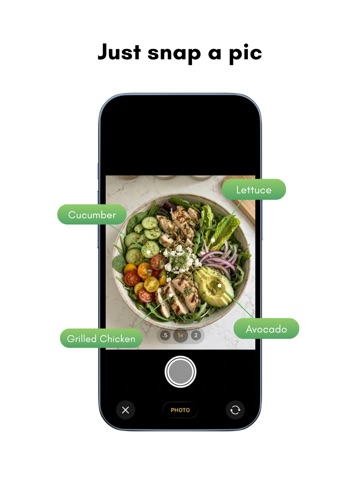
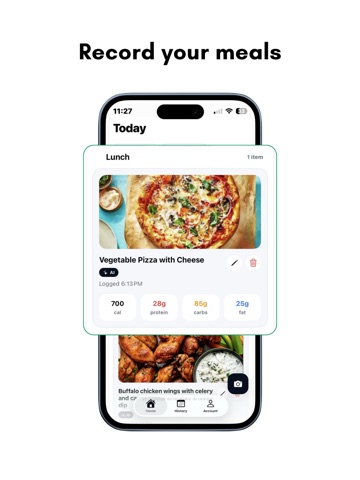
Stop Guessing. Start Knowing. Cado is the calorie and macro tracker built for real results. Snap a photo of any meal — home-cooked, takeout, or dining out — and get an instant breakdown of calories, protein, carbs, and fat. No manual entry. No database scrolling. Just point, snap, done. How to Use Cado Tracking your nutrition has never been easier. Here's how to get started: Snap a Photo — Open the app and point your camera at any meal, snack, or ingredient. No barcode scanning or manual searching required. Instant AI Analysis — Cado's AI automatically identifies what's on your plate and breaks down the calories, protein, carbs, and fats in seconds. Review & Confirm — Check the nutritional breakdown and log it with a single tap. Track Your Day — View your daily totals, monitor your macros, and stay on top of your nutrition goals — all in one place. That's it. No more guessing, no more typing. Just eat, snap, and track. Why Cado Works: Reliable AI, Every Time. No wild calorie errors. No lost meal logs. Cado's food recognition is consistent and trustworthy — every single scan. You're Always in Control. Adjust portions, swap ingredients, or correct a scan in just a few taps. The AI gives you a smart starting point; you have the final say. Macros That Move With You. Syncs with Apple Health so your active days are rewarded, not penalised. Log a workout and watch your targets update in real time. One-Tap Meal Memory. Save your favourites and repeat meals in a single tap. Stay consistent without the effort. Track Everything That Matters. Calories · Protein · Carbs · Fat · Hydration · Weight trends · Barcode scanner · Restaurant & international food support Cado is free to download. Full access to all features requires a Cado Premium subscription, available as an in-app purchase. Subscription pricing and terms are shown at the time of purchase. Terms of Use: https://www.apple.com/legal/internet-services/itunes/dev/stdeula/
Latest release
What’s New
Bug fixes and UI changes.
Audience growth
Ratings growth
Baseline captured. Growth appears after the crawler observes a changed rating count.
Momentum comes from crawler snapshots for the tracked storefront. “Viral growth signal” means unusually fast recent rating gains; it is an indicator, not download data.
Price tracking
Price intelligence
First snapshot captured. The trend line starts after the next crawler price observation.
- First observed Sep 4, 2026 · 7:44 AM Free
Screenshots