About this app
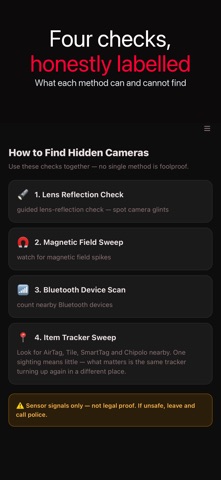
A four-mode privacy sweep for hotel rooms, rentals, changing rooms and your own bag. ITEM TRACKER DETECTION • Identifies nearby AirTag, Tile, SmartTag and Chipolo trackers by their Bluetooth signature • Follow detection — the app remembers what it has seen, so it can tell you when the same tracker keeps reappearing across separate sweeps in different places. That pattern, not a single sighting, is what matters • Distance band by signal strength, so you can walk toward it • Your own paired devices are filtered out, and anything found is labelled as a lead to check, never as proof CAMERA AND ROOM SWEEP • Lens reflection check — a guided walkthrough that uses the camera to help you spot the glint of a lens in vents, smoke detectors and mirrors • Bluetooth device scan — counts nearby signals and flags unnamed devices sitting close by • Magnetic anomaly — takes a two-second baseline when the scan starts, then alerts on field spikes as you sweep past fittings ROOM-BY-ROOM SWEEP LIST Work through bedroom, bathroom, living room and office, marking each as swept. Progress saves itself, so an interrupted sweep can be picked up later. RECORDS • Every scan is saved with a 7-day trend and a plain-language summary • Note and favourite any scan; compare two saved scans side by side • Export as CSV or share a single result • Watchlist — mark a device as suspicious and the app tells you when it shows up again WHAT THIS APP CAN AND CANNOT DO iPhone cameras have infrared-cut filters, so this app does not see infrared. The lens check works on reflection: a lens returns a distinctive glint when light hits it straight on. Bluetooth gives you presence and rough distance, never direction. Magnetic detection depends on starting somewhere clean and sweeping slowly. No phone app can guarantee a room is clear — use all four checks together, and treat every hit as something to look at rather than a verdict. If you believe you are being followed or watched, contact local authorities. This app is a tool for looking, not evidence. Available in 25 languages.
Latest release
What’s New
Two scan modes have been renamed to say what they actually do. • "Infrared Camera Scan" is now "Lens Reflection Check". iPhone cameras have infrared-cut filters, so this app has never been able to see infrared. What the mode really does — and always did — is guide you through looking for the glint a lens throws back when light hits it straight on. • "Wireless Device Scan" is now "Bluetooth Device Scan". It scans Bluetooth only. It has never scanned Wi-Fi, and the old name implied otherwise. The store description has been rewritten along the same lines, and it now documents the tracker detection — AirTag, Tile, SmartTag and Chipolo, with follow detection across separate sweeps — which has been in the app for a while without ever being mentioned. Also removed a leftover piece of code that scored a "threat" from camera brightness. Nothing called it, and the idea behind it did not work on a phone that filters infrared. Also new: • The Guide now covers the tracker sweep. Tracker detection has been in the app for a while, but the guide only explained the three camera and room checks. • When the same tracker turns up across separate sweeps, tapping the warning now opens a short walkthrough: how to narrow down where it is, photograph it before moving it, silence it, rule out the ordinary explanations, and when to involve the authorities. • The lens check now saves its result. Finishing a walkthrough used to leave no trace at all — no history entry, no trend — because the mode has no sensor that produces a threat score.
Audience growth
Ratings growth
Baseline captured. Growth appears after the crawler observes a changed rating count.
Momentum comes from crawler snapshots for the tracked storefront. “Viral growth signal” means unusually fast recent rating gains; it is an indicator, not download data.
Price tracking
Price intelligence
First snapshot captured. The trend line starts after the next crawler price observation.
- First observed Aug 18, 2026 · 2:58 AM Free
Screenshots