About this app
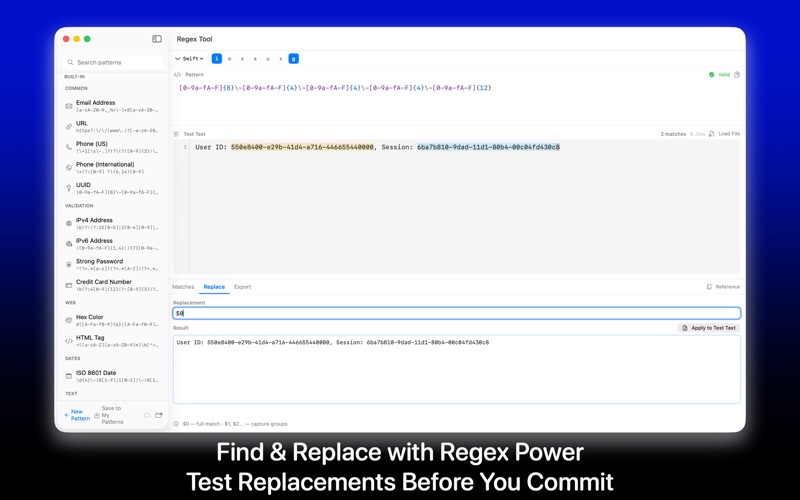
Regex Tool is a powerful regex tester and pattern editor built natively for Mac. Write regular expressions, paste your text, and instantly see every match highlighted in real time. Designed for developers who need a fast, reliable way to build, debug, and export regex patterns without switching to a browser. Type your regex pattern in the editor and watch matches appear instantly in your test text. Every match is highlighted with a distinct color, and capture groups are broken down so you can inspect each one individually. The live matching engine runs as you type with zero delay, powered by the same NSRegularExpression and ICU engine used in Xcode, Swift, and Objective-C projects. The replace mode lets you write replacement patterns using backreferences and see the transformed output in a live preview. Test complex find-and-replace operations before committing them to your code. Whether you are cleaning up log files, parsing CSV data, or refactoring string patterns, the replace preview shows you exactly what will change. Regex Tool includes a built-in library of ready-to-use patterns for the most common tasks. Email validation, URL matching, phone numbers, IP addresses, dates, UUIDs, HTML tags, hex colors, password strength checks, and more. Each pattern comes with sample text so you can see how it works immediately. Use these as starting points and modify them to fit your needs. The syntax highlighter colors your regex pattern as you type. Groups, character classes, quantifiers, anchors, and escape sequences each get a distinct color, making complex patterns easy to read and debug. Invalid syntax is underlined in red with a clear error message so you know exactly what to fix. Save your patterns to a personal library organized with folders. Search, favorite, and pin the patterns you use most. Regex Tool stores everything locally by default with optional iCloud sync that keeps your library in sync across Mac and iPhone. Export your regex to production-ready code in eight programming languages: Swift, Python, JavaScript, Go, Rust, Java, C#, and PHP. Each snippet is properly escaped for the target language, includes the right flags, and is ready to copy-paste into your project. No more manual escaping or syntax lookup. The built-in cheat sheet covers everything from basic character classes and quantifiers to advanced lookahead, lookbehind, and named capture groups. Every element is clickable and inserts directly into your pattern editor, so you can learn and build at the same time. Regex Tool runs entirely on your Mac. No internet connection required, no data sent anywhere, no account needed. It is sandboxed, private by design, and processes everything locally. Your patterns and test data never leave your device unless you choose to enable iCloud sync. The app supports multiple regex flags including case insensitive, multiline, dot matches all, unicode word boundaries, and extended mode with comments. Toggle flags with a single click and see how they affect your matches in real time. Whether you are a seasoned developer debugging production patterns, a student learning regular expressions for the first time, or a data analyst cleaning up text files, Regex Tool gives you everything you need in a clean, fast, native Mac app. No browser tabs, no slow web tools, no distractions. Just type, match, and ship. Terms: https://www.apple.com/legal/internet-services/itunes/dev/stdeula/
Audience growth
Ratings growth
Baseline captured. Growth appears after the crawler observes a changed rating count.
Momentum comes from crawler snapshots for the tracked storefront. “Viral growth signal” means unusually fast recent rating gains; it is an indicator, not download data.
Price tracking
Price intelligence
First snapshot captured. The trend line starts after the next crawler price observation.
- First observed Aug 8, 2026 · 5:15 PM Free
Screenshots