About this app
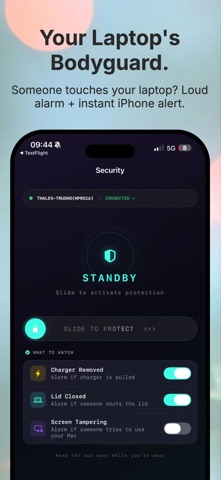
Walk Away. Your Computer Locks Automatically. Ever walked away from your desk at the office or a cafe and realized you left your computer unlocked? Meet Proximity Lock, the invisible bodyguard for your data. Using Bluetooth Low Energy (BLE), this app turns your iPhone into a smart security key. It automatically locks your computer or puts it to sleep the moment you step away, ensuring your private information stays private. Tutorial and download the macOS app here: https://tqtuan1201.github.io/public/apps/proximity/ KEY FEATURES 1. Proximity Auto-Lock • Fully Automatic: No manual input needed. Just carry your phone and walk away; your device locks instantly. • Smart Signal Filter: Advanced algorithms ignore brief signal interference, only locking when you have actually left the area. • Work-Aware: Detects active usage and will not lock your computer while you are typing or presenting. • Multi-Device Support: Pair multiple phones. The computer only locks when all paired devices are out of range. 2. Cafe Mode (Anti-Theft) Stepping away in a public space? Enable Cafe Mode for extra protection: • Siren Alarm: Triggers a loud alarm if someone tries to unplug, close, or move your device. • Instant Alerts: Receive real-time notifications on your phone the second suspicious activity is detected. 3. Remote Control & Monitoring • One-Tap Lock: Secure your computer manually with a single tap from your phone. • Status Monitor: Check battery levels and lock status remotely. • Activity Log: View a detailed timeline of security events and timestamps. WHY CHOOSE PROXIMITY LOCK? • Absolute Privacy: No accounts, no cloud. All connections stay local and encrypted between your devices. • Quick Setup: Pair your devices in seconds using a simple QR code. • Battery Efficient: Optimized for BLE to ensure minimal impact on your phone and computer battery life. REQUIREMENTS • Requires the companion app installed on both your iPhone and your Macbook . • Optimized for macOS.
Latest release
What’s New
What’s New in this Version - Introduced an enhanced Work Mode experience for more focused and uninterrupted productivity. - Added the ability to install Home Screen widgets directly from within the app for quicker setup. - Refined the About page with a cleaner layout and improved navigation. - General performance improvements and bug fixes.
Audience growth
Ratings growth
Baseline captured. Growth appears after the crawler observes a changed rating count.
Momentum comes from crawler snapshots for the tracked storefront. “Viral growth signal” means unusually fast recent rating gains; it is an indicator, not download data.
Price tracking
Price intelligence
First snapshot captured. The trend line starts after the next crawler price observation.
- First observed Aug 11, 2026 · 9:11 AM Free
Screenshots