About this app
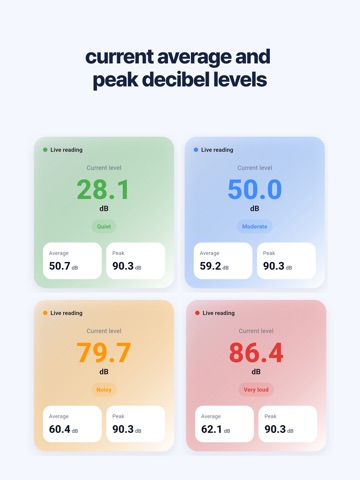
Measure surrounding noise instantly and easily. Sound Meter uses your phone microphone to display real-time decibel levels with a clean and simple interface. No setup needed. Just open the app and start measuring. --- Key Features Real-time noise measurement - Measure ambient noise instantly - Large and clear decibel display - Fast response to sound changes - Works indoors and outdoors Average and peak values - View current average and peak decibel levels - Track noise changes over time - Compare different environments easily Noise level guide - Shows levels like quiet, moderate, loud - Easy to understand without technical knowledge - Helps interpret sound instantly Simple and intuitive use - Start measuring immediately - No complex settings - Designed for daily use Clean design - Minimal UI focused on essentials - Large numbers for easy reading - Quick open and check --- Recommended for People checking noise between floors - Monitor apartment or neighbor noise - Get objective noise levels People managing study or sleep environment - Check if the space is quiet - Improve focus and rest People curious about daily noise - Measure noise in cafes, streets, or offices - Understand surroundings easily People who want a simple tool - No unnecessary features - Fast and lightweight --- How to use - Start measuring Open the app and measurement starts automatically Real-time decibel levels are displayed - Check values View average and peak values Use the noise guide for quick understanding - Use anytime Open and measure anytime No setup required --- Why choose Sound Meter - Free to use with all features - Fast and lightweight performance - Simple UI with no learning needed - Practical for real-life use - Works offline without internet --- Privacy - No personal data is collected - All processing is done on your device --- Developer Note Sound Meter focuses on simplicity and speed. Only essential features are included. At home, in cafes, or on the street Measure your surroundings anytime with ease Download now and check your noise level instantly
Latest release
What’s New
We fixed bugs and improved usability.
Audience growth
Ratings growth
Baseline captured. Growth appears after the crawler observes a changed rating count.
Momentum comes from crawler snapshots for the tracked storefront. “Viral growth signal” means unusually fast recent rating gains; it is an indicator, not download data.
Price tracking
Price intelligence
First snapshot captured. The trend line starts after the next crawler price observation.
- First observed Aug 28, 2026 · 9:05 AM Free
Screenshots