About this app
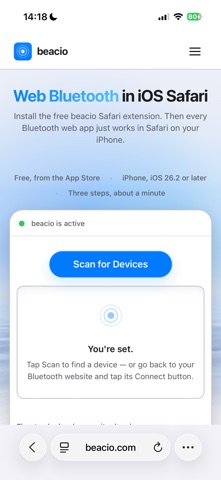
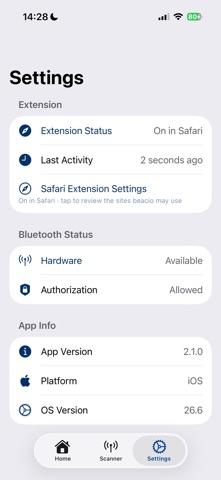
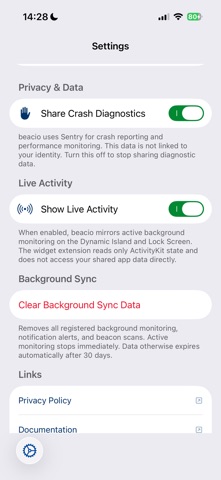
beacio brings Bluetooth Low Energy (BLE) to Safari on iOS, letting you connect to BLE devices directly from web pages — no dedicated native app needed for each device. HOW IT WORKS beacio is a Safari Web Extension paired with a companion app. Install it, then finish setup in Safari: on any website, tap aA, tap Manage Extensions, and turn beacio on. For site access, tap aA, tap beacio, and tap Enable on all websites — Safari's own permission sheet follows, where you choose Always Allow… and then on every website. This route never touches Settings. If you prefer, the same grant can also be made in Settings → Apps → Safari → Extensions → beacio under Permissions, where the row is labelled Other Websites on iOS 26. Once enabled, websites use the standard Web Bluetooth API: beacio installs navigator.bluetooth in Safari, so a site already built for Web Bluetooth works with no code changes and no script tag. A vendor-prefixed navigator.beacio namespace is available alongside it for sites that want to detect beacio explicitly. KEY FEATURES - Full Web Bluetooth API support: requestDevice(), GATT service and characteristic discovery, read/write operations, and real-time notifications - Batch GATT operations for fast, efficient device communication - Native iOS device picker for secure device selection - Connection persistence across tab switches and brief app suspensions - Optional background sync registrations for alerts and beacon monitoring that you explicitly enable from supported websites - Standalone BLE scanner in the companion app for independent testing - Extension status dashboard with real-time monitoring USE CASES - IoT Dashboards: Monitor and control smart home devices, sensors, and actuators from web-based dashboards in Safari, including optional background alerts for important state changes - Fitness & Health: Connect to heart rate monitors, cycling sensors, and other fitness peripherals through web apps, with optional notifications for tracked measurements - Smart Home: Interact with BLE-enabled lights, locks, thermostats, and appliances via browser-based interfaces - Development & Prototyping: Test and debug BLE peripherals using web-based tools like nRF Connect for Web, without switching between native apps - Education: Build and experiment with BLE projects using web technologies SECURITY & PRIVACY beacio is secure by design. Every Bluetooth connection requires your explicit consent through the native iOS device picker. Optional background monitoring is available only when a supported website explicitly registers it and you grant the required permissions. The extension collects no personal data and performs no tracking. Crash reporting via Sentry uses EU-based data residency and captures only diagnostic data (crash logs, performance metrics) that is never linked to your identity. REQUIREMENTS - iOS 26.2 or later - iPhone with Bluetooth Low Energy support - Compatible BLE peripherals INSPIRED BY OPEN STANDARDS beacio implements the W3C Web Bluetooth specification used by Chrome and Edge on desktop and exposes it under the standard navigator.bluetooth name — the same device discovery, GATT read/write and notification operations. Existing Web Bluetooth sites work unchanged, with the vendor-prefixed navigator.beacio namespace available for explicit feature detection. FOR DEVELOPERS Visit beacio.com for integration documentation and the API reference. No SDK and no script tag is required: navigator.bluetooth comes from the extension itself, and the optional beacio.js helper only adds convenience and feature detection.
Latest release
What’s New
Setup is now one screen instead of three. • The multi-step setup walkthrough is gone. The home screen shows a single setup card that tells you exactly what is still missing and takes you straight there — Safari's extension settings, or Bluetooth access in Settings — in one tap. • While beacio is on for a site, it activates on every page there — no extra tap per page. • Clearer recovery when Bluetooth is turned off for beacio: instead of silently failing, the app says so plainly and opens the right Settings screen for you. • More reliable start-up on pages that load beacio early. This version requires iOS 26.2 or later.
Audience growth
Ratings growth
Baseline captured. Growth appears after the crawler observes a changed rating count.
Momentum comes from crawler snapshots for the tracked storefront. “Viral growth signal” means unusually fast recent rating gains; it is an indicator, not download data.
Price tracking
Price intelligence
First snapshot captured. The trend line starts after the next crawler price observation.
- First observed Sep 4, 2026 · 2:39 AM Free
Screenshots